>_vmmbare metal microvm manager
>_ Firecracker · Ubuntu 24.04 · Go

Spin up VMs like containers.
Keep the isolation of a VM.

vmm runs lightweight Firecracker microVMs and whole Kubernetes clusters on a single bare-metal host, from one CLI and a browser console. Each VM boots in seconds with its own kernel, IP address and SSH access.

session / quick start host ready
$ sudo vmm create dev-box --cpus 2 --memory 2048
$ sudo vmm start dev-box
$ vmm list
NAME      ID        STATE    CPUs  MEMORY   IP ADDRESS
dev-box   1e2e5700  running  2     2048 MB  172.16.0.2
$ vmm ssh dev-box
root@vmm-guest:~# 
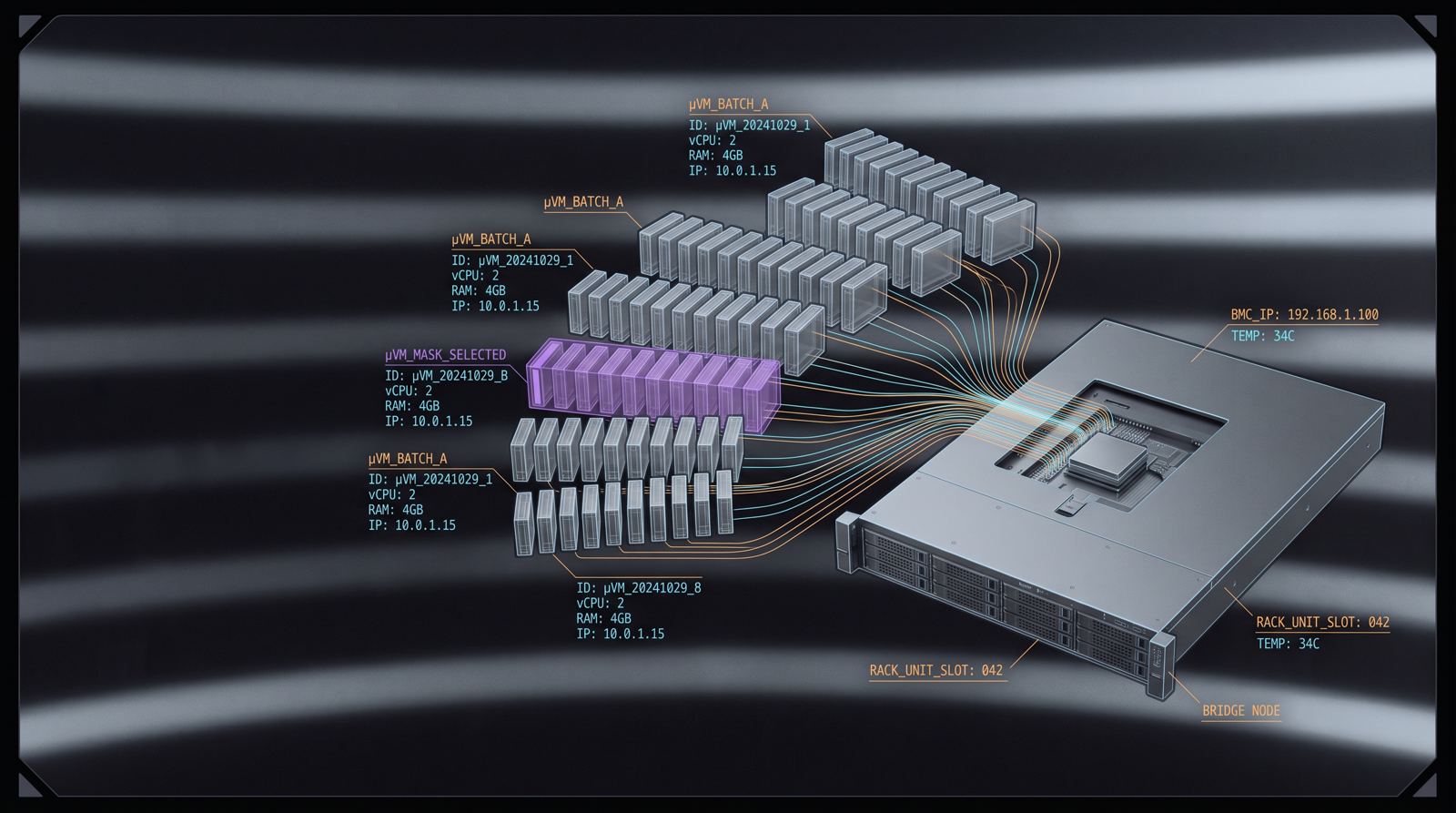
Illustration of a bare-metal server with rows of microVMs rising from it, each wired back to a single bridge
fig.01 — one host, many microVMs, one bridgevmm-br0 · 172.16.0.0/16
engine
Firecrackerv1.16.0
scale
10–50concurrent VMs
host
Ubuntu24.04 + KVM
arch
amd64x86_64 only

Personal software. vmm was built, mostly with Claude Code, to scratch its author's own itch. It is tested on Ubuntu 24.04 and works well there, but there are no guarantees on other setups. Caveat user.

01 Features

Everything a dev or lab VM needs, nothing it doesn't.

Somewhere between Docker and a full hypervisor: real kernels and real isolation, with container-like speed and a command line that stays out of your way.

compute / firecracker

Firecracker microVMs in seconds

Each VM is a single Firecracker process with its own kernel, ext4 rootfs, TAP device and IP. Set vCPUs, memory and disk per VM, or set defaults once in config.json. VMs can start automatically at boot through a systemd unit, and vmm console shows the serial output for debugging boots and kernel panics.

$sudo vmm create myvm --cpus 2 --memory 1024 --disk 4096
access / ssh

SSH that just works

vmm generates and manages its own Ed25519 key and injects it into every VM, so --ssh-key is optional. Your own keys are added alongside it.

$vmm ssh myvm
images / docker

Root filesystems from Docker images

Turn any Docker image into a bootable rootfs, or pull ready-made Ubuntu 24.04, Kubernetes, security and dev images from GitHub releases.

$sudo vmm image import ubuntu:22.04 --name base
state / memory + disk

Full VM snapshots

Capture a running VM's memory, device state and disks, then roll it back in place later. Useful before risky upgrades, or for replaying an exploit from a known state.

$sudo vmm snapshot create myvm clean
net / bridge + nat

Networking handled for you

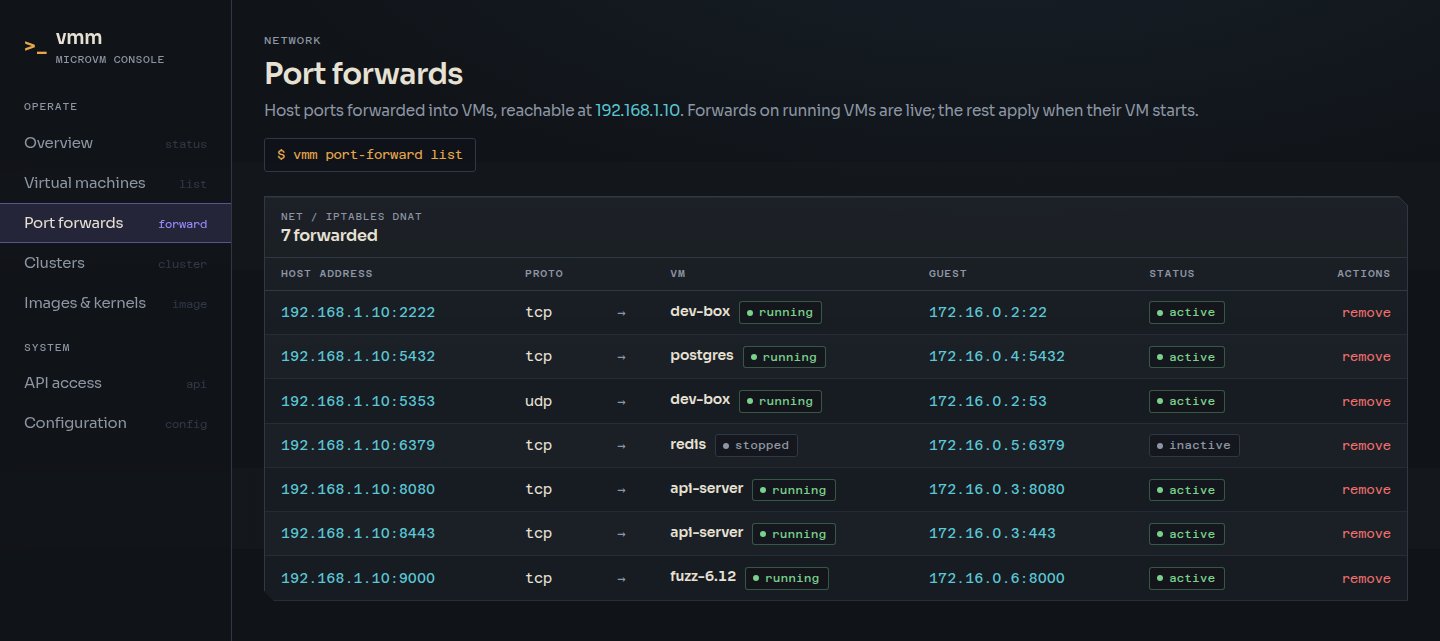
A Linux bridge, TAP devices, IP allocation and NAT are set up automatically. VMs are reachable from the host by default. Idempotent iptables rules forward ports and custom DNS servers can be set per VM.

$sudo vmm port-forward add myvm 8080:80
orchestration / kubeadm

Kubernetes clusters in one command

Build multi-node clusters from microVMs with kubeadm, using Cilium (with kube-proxy replacement) or Calico. Pick the Kubernetes version by choosing a rootfs image, add worker nodes, and optionally add an admin workstation with kubectl already configured. The cluster context is merged into your kubeconfig, so you can use kubectl from the host straight away.

$sudo vmm cluster create lab --workers 2 --cni cilium --admin-workstation
orchestration / microshift

Single-node OpenShift

Run an OpenShift-derived cluster with upstream MicroShift on OKD payload images. No Red Hat subscription is needed.

$sudo vmm cluster create ocp --type openshift
fs / block devices

Host directory mounts

Share host directories with a VM as ext4 block devices at /mnt/<tag>, read-only or read-write, and sync them back when you're done.

$sudo vmm create myvm --mount ~/code:code:ro
kernels / build profiles

Custom and research kernels

Pre-built kernels for general use, Kubernetes (BTF, eBPF, tracing), and security research across the 5.10–6.18 LTS series, including KASAN builds. You can also build your own with a profile.

$sudo vmm kernel pull kasan-kernel
ui / vmm-web

Web console & JSON API

An optional browser console for VMs, clusters and images, with live state updates, an in-browser SSH terminal and a Bearer-token REST API.

$VMM_WEB_PASSWORD=… sudo -E vmm-web
lifecycle / vmm upgrade

Upgrades without downtime

One command moves the host to the latest release. vmm upgrade checks the download against the release checksums, swaps vmm and vmm-web in place and upgrades Firecracker when a release needs it. It then restarts only the web console. Running VMs keep running, the previous binaries are kept for --rollback, and the web console tells you when a new version is out.

$ vmm upgrade --check
installed: 0.14.0
latest:    0.15.0
$ sudo vmm upgrade
  [ok] vmm 0.15.0
  [ok] vmm-web 0.15.0
  [ok] vmm-web.service restarted
# running VMs were not stopped
02 Web console

The whole host, at a glance.

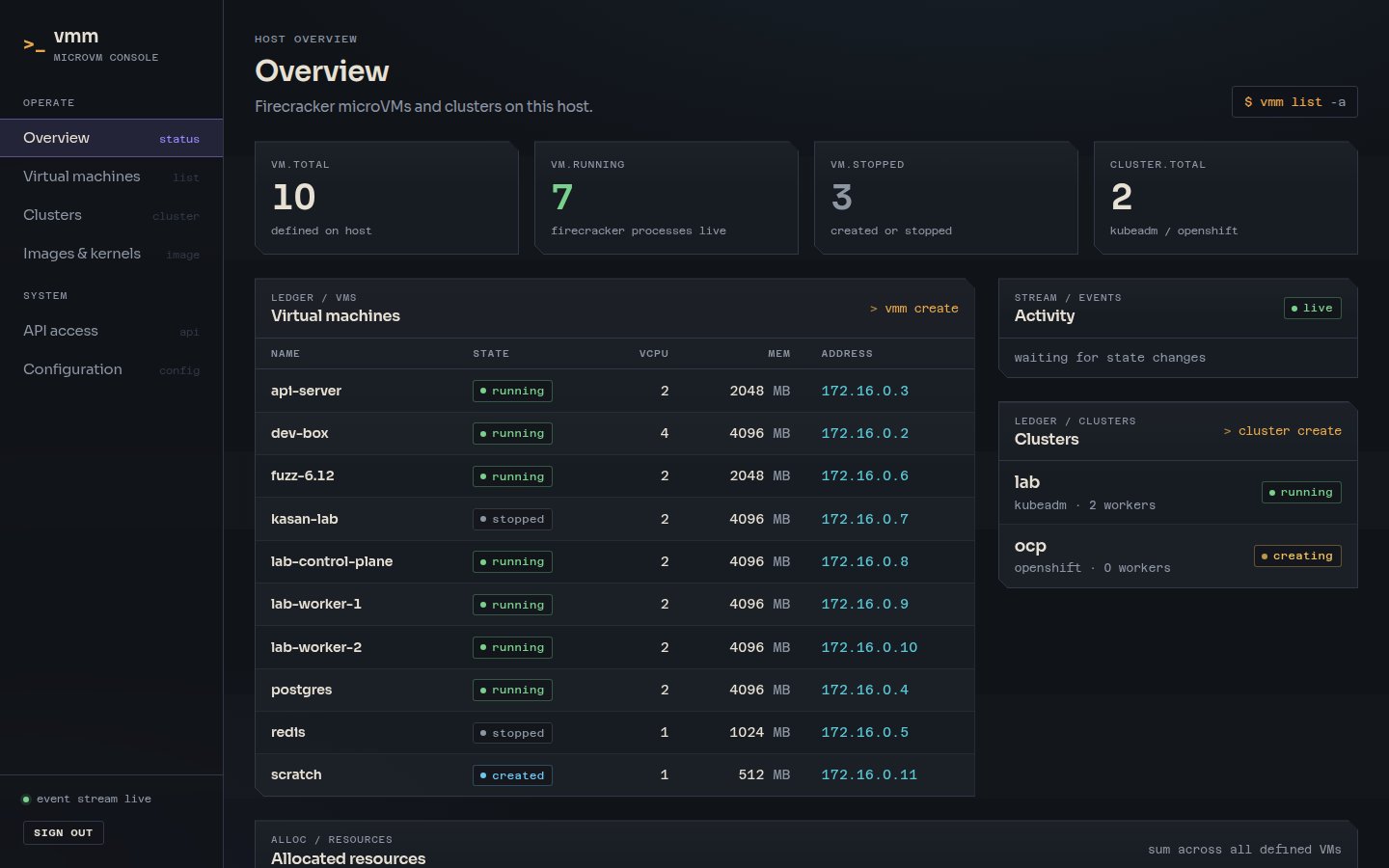
vmm-web is a separate, optional binary. It gives you a dashboard for every VM and cluster, live state updates, and a terminal that runs in the browser.

vmm-web dashboard showing VM counts, a ledger of virtual machines with state and IP addresses, a live activity stream and clusters
screen / overviewDashboard: VM ledger, live event stream, clusters and allocated resources
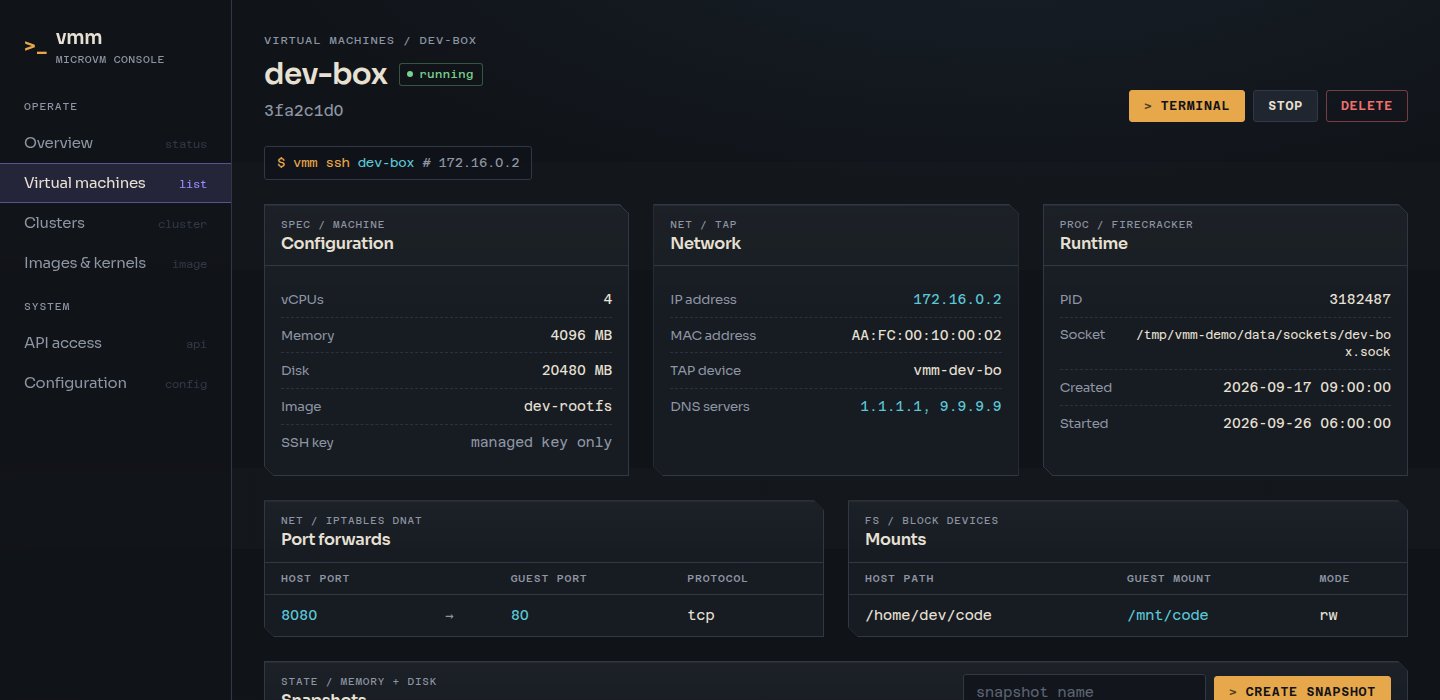
vmm-web VM detail page showing configuration, network and runtime panels plus port forwards and mounts
screen / vm detailSpec, network, runtime, port forwards and snapshots
vmm-web in-browser terminal connected to a VM showing kernel version, memory and network interface
screen / terminalWebSocket-to-SSH terminal, no client needed

Secure by default

Binds to localhost unless you say otherwise. It enforces a password, CSRF protection, a strict CSP and rate-limited login.

Scriptable

The JSON API under /api/v1 can list, create, start, stop and delete VMs and clusters using a Bearer token.

Runs as a service

A systemd unit reads its password from /etc/vmm-web/environment, so the console is available as soon as the host boots. It also flags new releases, which sudo vmm upgrade installs.

03 How it works

Plain Linux building blocks, stitched together.

No daemon to babysit. vmm uses Firecracker, TAP devices, a bridge and iptables directly, and keeps its state in JSON files you can read.

vmmCLI · create · start · ssh · cluster
vmm-webdashboard · terminal · REST API
▼
configJSON state
networktap · nat
imagekernels · rootfs
clusterkubeadm · microshift
▼
firecrackerone process per microVM · KVM
▼
vmm-br0 · 172.16.0.1/16bridge → iptables MASQUERADE / DNAT → host interface
  • StateVM and cluster configs are JSON files in /var/lib/vmm, written atomically. Change the location with vmm config set data_dir.
  • IsolationEvery VM gets its own guest kernel inside a KVM-backed Firecracker process. It is much stronger isolation than a shared-kernel container.
  • LifecycleStop escalates from Ctrl+Alt+Del to SIGTERM to SIGKILL and waits for the process to exit. Failed starts roll back their TAP device, IP and socket.
  • NetworkingVMs share a bridge with NAT out through the host interface. Only the ports you forward are exposed beyond the host.
  • Upgradesvmm upgrade verifies a release against its checksums, then swaps binaries by atomic rename, keeping .prev copies. Firecracker processes that are already running are untouched, so VMs keep running through an upgrade.
  • DownloadsKernels and rootfs images come from GitHub releases and are checked against SHA256 checksums when they are published.
04 Install & upgrade

One command to install. One command to upgrade.

No clone and no build step. The installer fetches a verified release, Firecracker and the default images. After that, vmm upgrade keeps the host current without stopping your VMs.

  1. Run the installer

    Check that virtualisation is enabled (/dev/kvm should exist), then install. Add --with-services to also set up VM auto-start and the web console.

    $ curl -fsSL https://raesene.github.io/baremetalvmm/install.sh \
        | sudo bash

    Options go after bash -s --: --with-services, --version 0.14.0, --no-images. Re-running the installer is safe. You can read the script first.

  2. Create, start and SSH into a VM

    VMs are reachable from the host straight away. Use vmm port-forward to expose services elsewhere.

    $ sudo vmm create myvm --cpus 2 --memory 1024
    $ sudo vmm start myvm
    $ vmm ssh myvm

    Optional: vmm config init writes ~/.config/vmm/config.json for VM defaults, or a different data directory with --data-dir.

  3. Optional: a Kubernetes cluster

    vmm uses the Kubernetes kernel and a k8s-<version> rootfs when they are installed, and merges a vmm-<name> context into your kubeconfig.

    $ sudo vmm cluster create lab --workers 2
    $ kubectl --context vmm-lab get nodes
  4. Upgrade in place

    Upgrades are checksum-verified and swap the binaries in place. Running VMs keep running, and only the web console restarts. The console also tells you when a new release is out.

    $ vmm upgrade --check
    $ sudo vmm upgrade

    Undo with sudo vmm upgrade --rollback. Don't stop vmm.service to upgrade: stopping it stops every running VM. vmm upgrade ships from v0.14.0; re-run the installer to upgrade older versions.

  5. Uninstall any time

    The uninstaller is idempotent and removes binaries, services, data and NAT rules. Add --yes to skip the prompt.

    $ sudo /usr/local/share/vmm/uninstall.sh
05 Documentation

Go deeper.

The full guides live in the repository alongside the code.

GuideCoversFile
CLI referenceEvery command, flag and optiondocs/commands.md
ConfigurationConfig file, VM defaults, data directory, shell completiondocs/configuration.md
Images & kernelsAvailable images, Docker import, custom kernels, snapshotsdocs/images-and-kernels.md
Networking & mountsNetwork layout, port forwarding, DNS, SSH keys, host mountsdocs/networking.md
Kubernetes clusterskubeadm with Cilium or Calico, workers, admin workstationdocs/kubernetes.md
OpenShift clustersSingle-node MicroShift on OKD payload imagesdocs/openshift.md
Web UIDashboard, web terminal and JSON APIdocs/web-ui.md
Security testingSecurity and KASAN kernels for vulnerability researchdocs/security-testing.md
DevelopmentBuilding from source, project layout, systemd servicesdocs/development.md
TroubleshootingCommon problems and how to debug themdocs/troubleshooting.md